

People are increasingly using ChatGPT, Perplexity, Gemini, Google AI Overviews, and other AI search experiences to research products, compare companies, and find answers. Generative Engine Optimization, or GEO, focuses on improving how often a brand, website, or piece of content appears within these AI-generated answers.
GEO also introduces a different set of metrics. Instead of looking only at keyword rankings and organic traffic, marketers need to track brand mentions, citations, AI share of voice, prompt visibility, competitor citation gaps, sentiment, and AI referral traffic. Technical factors matter too, including whether AI crawlers can access important pages and whether entities, products, and topics are clearly represented through structured data and internal relationships.
This has created a new category of GEO tools, but they do not all solve the same problem. In this article, we’ll look at how each tool works, the methodology behind it where available, who should use it, and how its features fit into a GEO workflow.
What Should a GEO Tool Actually Help You Do?
A good GEO workflow starts with the questions people ask, tracks how AI platforms respond, identifies which sources are being cited, and then shows where your brand is missing compared with competitors.
The exact feature set varies by tool, but most GEO platforms are built around a few core elements:
You may not need a tool that covers every one of these areas. A company mainly interested in brand monitoring may prioritize prompt, citation, and share-of-voice tracking. A content team may care more about citation gaps and page optimization, while a large e-commerce or publishing site may place more weight on entities, schema, and knowledge graphs.
That distinction is important when comparing the tools below. The best GEO tool is usually the one that matches the part of the GEO process you actually need to manage.
1. Profound
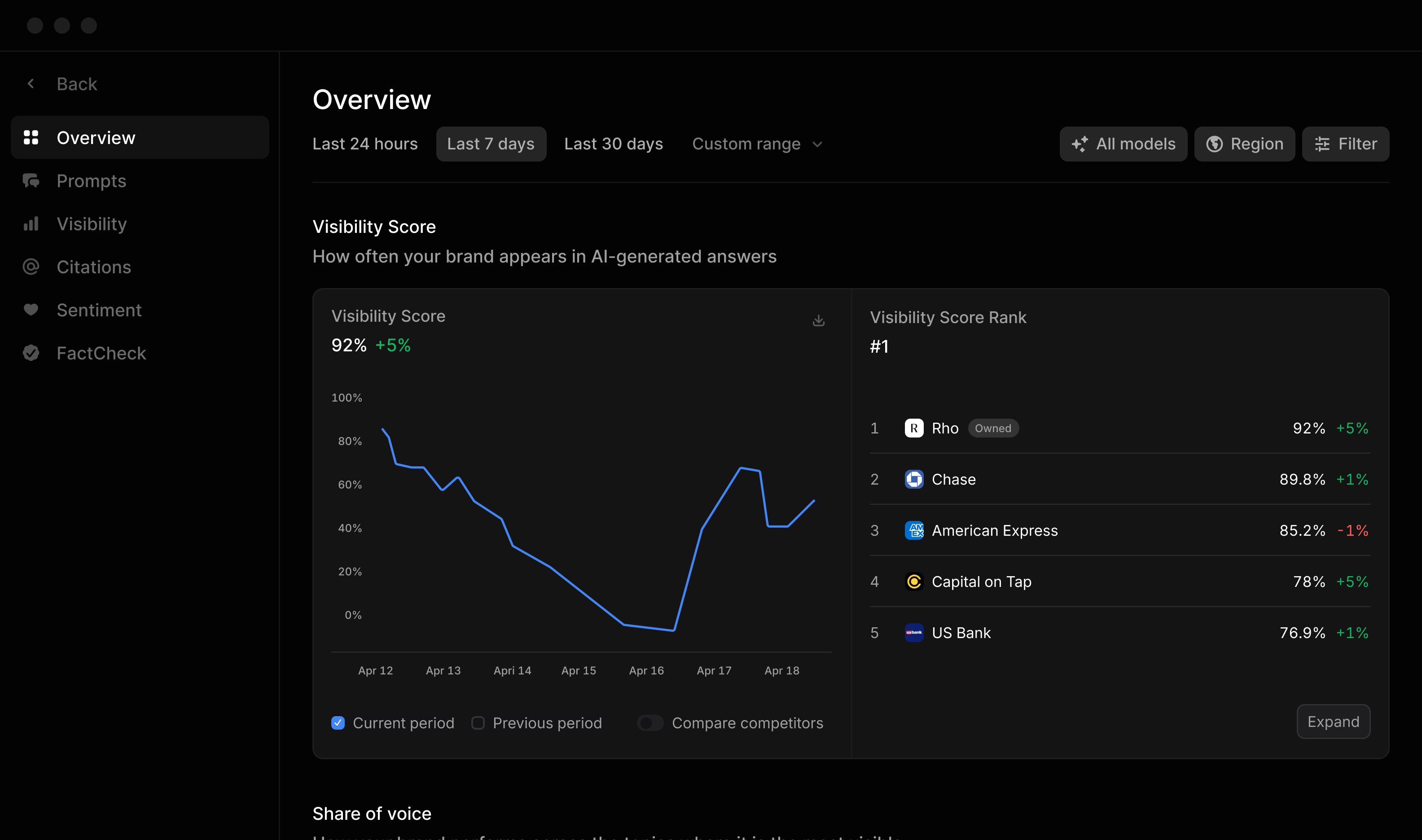
Profound is an AI visibility platform built for teams that want to track how their brand appears across AI answer engines. Instead of focusing on conventional keyword positions, it measures whether a brand is mentioned, how much visibility it receives compared with competitors, which sources are cited, and how that performance changes across prompts, topics, regions, and AI platforms.
How Does Profound Work?
Profound starts with prompts. Teams define the brands, competitors, topics, and questions they want to monitor, and Profound analyzes responses generated by supported answer engines.
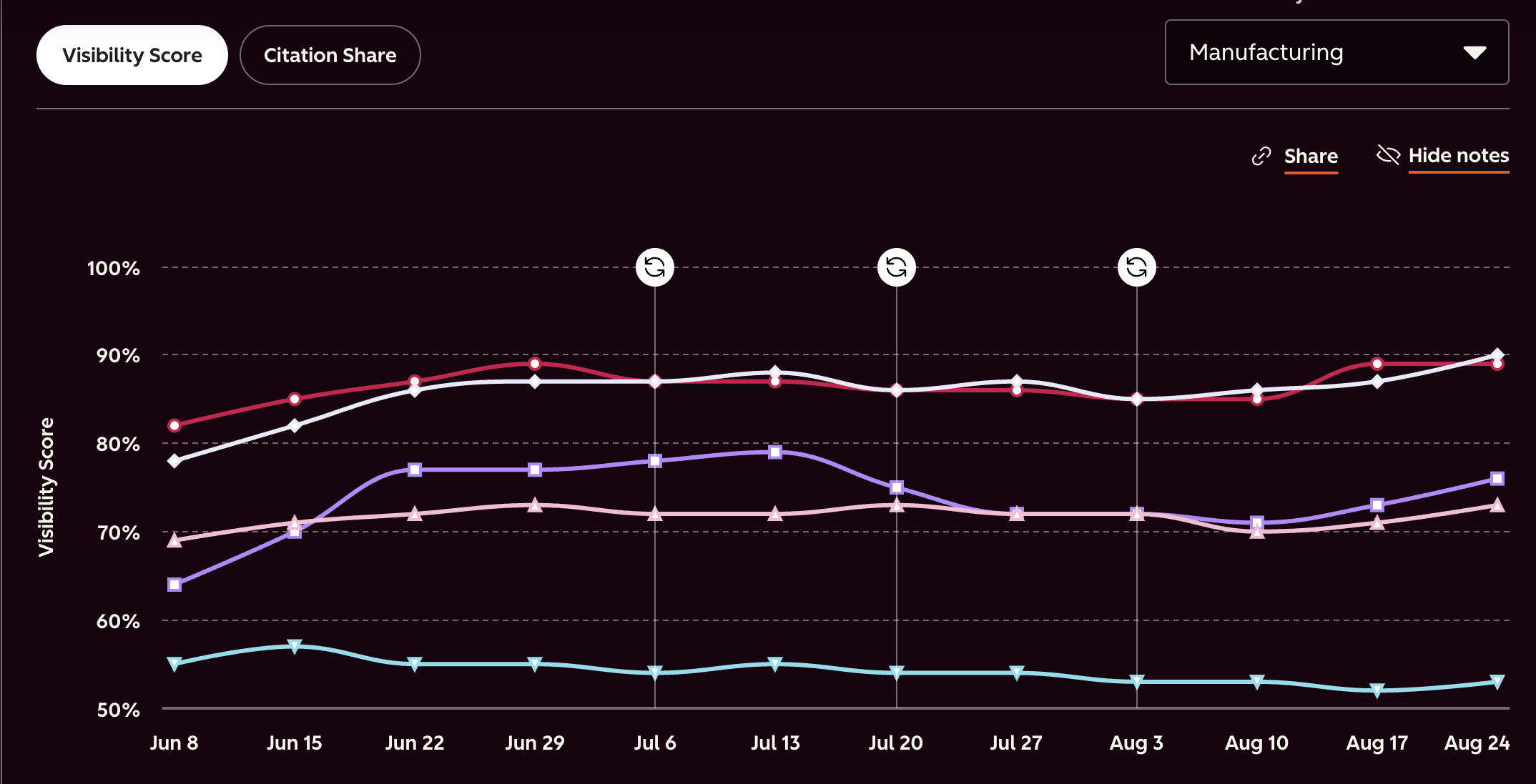
One of its primary measurements is Visibility Score. Profound checks whether your brand appears in each qualifying AI response and calculates the percentage of responses containing your brand. If your brand appears in 5 out of 10 qualifying responses, for example, the Visibility Score is 50%.
It then adds other layers of measurement, including:
- Share of Voice compares your visibility with competing brands within the tracked dataset.
- Citation data shows which domains and pages AI engines use as sources and how often your own website receives citations.
- Sentiment tracking measures how positively or negatively AI systems discuss your brand.
- Prompt Volumes helps teams identify questions that people are actually asking AI platforms rather than relying only on traditional keyword demand.
- Query Fanout Estimation predicts how an AI engine may turn one user prompt into several underlying search queries that contribute to retrieval and citations.
Who Should Use Profound?
Profound is better suited to larger marketing teams, enterprise SEO teams, GEO teams, agencies, and brands that need to monitor AI visibility across many topics and competitors.
It may be more than a small company needs if the only requirement is checking a handful of prompts every month. Its main benefit comes when you have enough brands, competitors, prompts, regions, and AI platforms to require a dedicated monitoring system.
How Should You Use Profound?
A good starting point is to create topics around the areas where you want your company to appear and add the competitors you regularly compete against. You can then use Profound to:
- Track Visibility Score over time to see whether your presence across AI-generated answers is increasing or decreasing.
- Compare Share of Voice against competitors rather than looking at your brand mentions in isolation.
- Review citations to find the domains and individual pages AI engines frequently use for your target prompts.
- Identify citation gaps where competing websites are repeatedly referenced but your website is absent.
- Study Prompt Volumes before deciding which AI queries deserve more attention.
- Monitor brand sentiment to see how AI systems describe your company relative to competitors.
- Break performance down by topics, regions, platforms, and audience groups when broader tracking is required.
- Use Agent Analytics when you also want to examine how AI crawlers interact with your website, rather than relying only on what appears in generated answers.
2. Otterly.AI
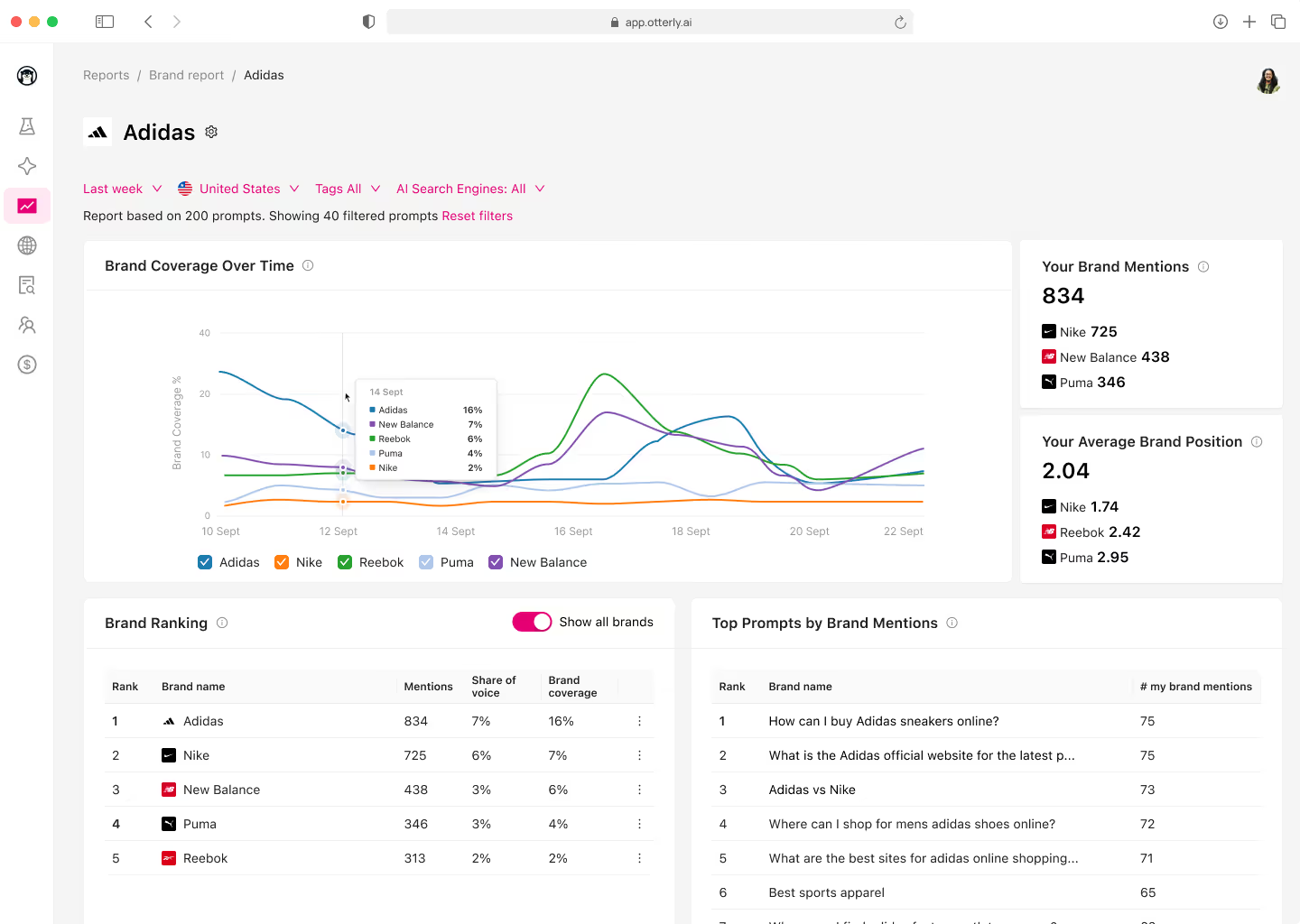
Otterly.AI is a GEO monitoring platform focused on tracking how brands and websites appear across AI search systems such as ChatGPT, Perplexity, Google AI Overviews, Google AI Mode, Gemini, and Microsoft Copilot. Its approach is built around recurring prompt monitoring, which makes it useful for teams that want a clearer picture of where their brand appears, which competitors are being mentioned, and which websites AI systems are citing.
How Does Otterly.AI Work?
Otterly.AI starts with a prompt library. These prompts are meant to reflect the conversational questions a potential customer might actually type into an AI search tool.
For example, instead of monitoring a conventional keyword such as:
“project management software”, you might monitor: “What are the best project management tools for a remote marketing team?”
Prompts can either be added manually or discovered through Otterly.AI's AI Prompt Research tool. Once added, the platform automatically monitors them daily across the AI search engines available in the account.
For every monitored prompt, Otterly.AI can then examine several signals:
- Brand mentions show whether your company appears in the generated response.
- Brand coverage looks at how prominently the brand appears within answers.
- Domain citations track whether AI systems reference pages from your website.
- Competitor mentions show which alternative brands appear for the same questions.
- Sentiment tracks the context in which your brand is discussed.
- Citation data identifies the domains and URLs AI systems repeatedly use as sources.
Who Should Use Otterly.AI?
Otterly.AI is a good fit for SEO teams, content marketers, agencies, SaaS companies, and small to mid-sized marketing teams that want regular AI visibility monitoring without building a large custom tracking system.
It can be particularly useful when:
- You already know the topics and prompts that matter to your audience.
- You want to compare your AI visibility with a defined group of competitors.
- You need to track citations as well as brand mentions.
- You manage several clients or brands and need separate reporting.
- You want daily monitoring rather than manually repeating the same searches across multiple AI platforms.
How Should You Use Otterly.AI?
Start by building a prompt set around the questions that could influence a buying decision. Avoid simply turning every SEO keyword into a prompt. Include comparison questions, category questions, recommendation queries, problem-based questions, and prompts where users are likely to ask AI systems to shortlist products or vendors.
Once your prompt set is running, you can use Otterly.AI in several ways:
- Use AI Prompt Research to find conversational queries related to your market rather than relying only on your existing keyword list.
- Track brand mentions to see which AI platforms mention your company and how that changes over time.
- Compare brand coverage with competitors to see whether your company is appearing prominently or being listed further down in generated recommendations.
- Monitor domain citations to determine whether your own website is actually being used as a source.
- Run Website Citation Gap Analysis to find domains and URLs that repeatedly receive citations for the topics you care about.
- Compare competitors to identify prompts where competing brands appear but yours does not.
- Review sentiment to check how AI systems describe your company when it is mentioned.
- Use country-level monitoring when visibility differs by market or when you operate across several regions.
- Use the GEO Audit on relevant pages when your brand appears in answers but your website is rarely cited.
3. TopCited
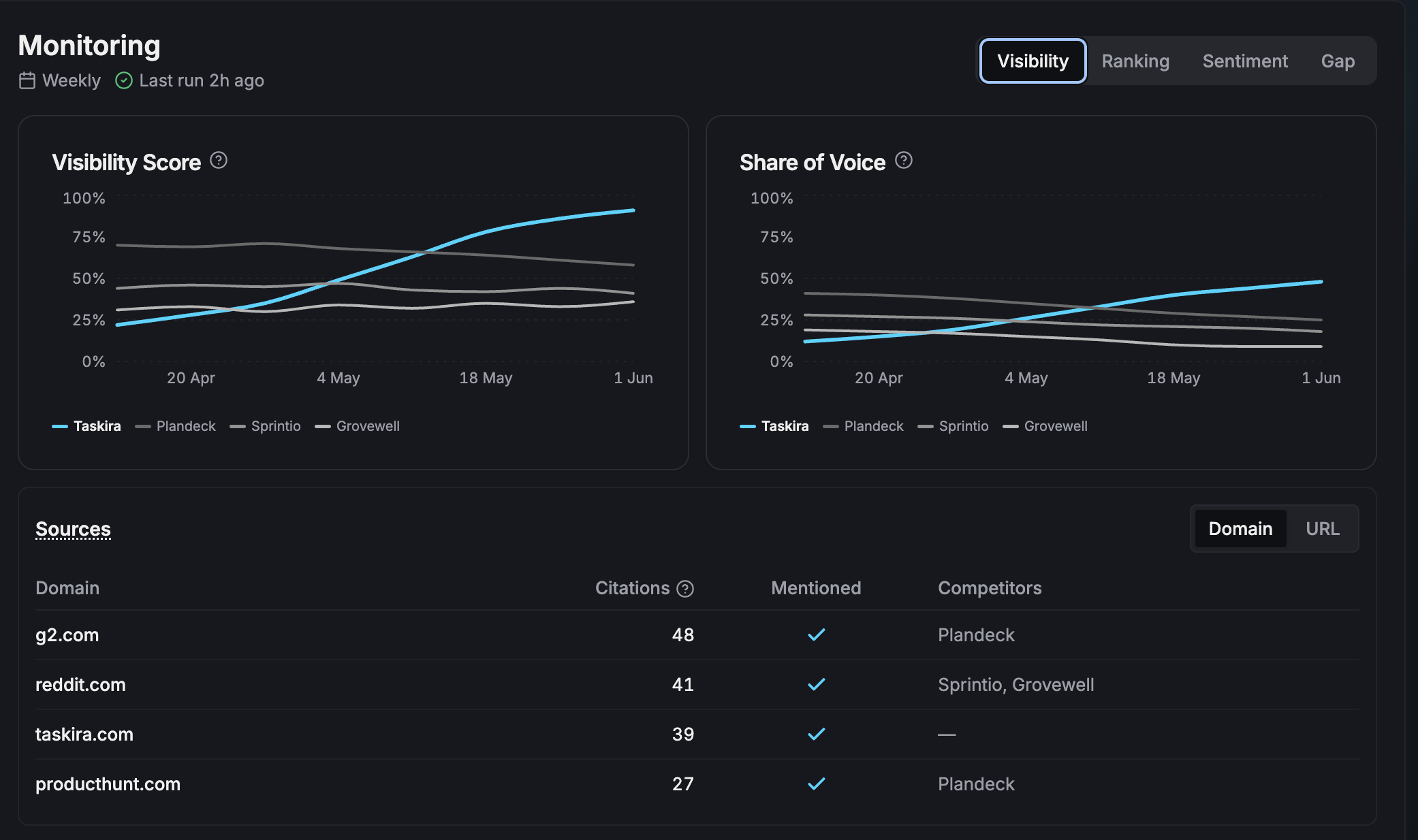
TopCited is a GEO platform that combines AI visibility monitoring with content optimization. While many GEO tools mainly show where a brand appears across AI answers, TopCited also tries to help teams improve the content before and after publication. It tracks mentions, citations, competitor visibility, and share of voice, then connects that data with its own content scoring and rewriting workflow.
How Does TopCited Work?
TopCited is built around what it calls the CORE methodology, short for Controlling Output Rankings in Generative Engines. The process follows four stages:
- Research: The system looks at citation patterns and published research to identify content characteristics associated with AI citations, such as sourced statistics, direct answers, and clear comparisons.
- Rewrite: Content is restructured so that important answers appear early, claims are supported by named sources, and comparisons are easier for AI systems to extract.
- Simulate: The revised content is tested across major LLMs, and TopCited assigns a 0 to 100% ranking-fit score based on how readily those systems may select or cite it.
- Repeat: The content can then be revised and tested again based on the score.
This closed-loop process is one of the main differences between TopCited and tools that only report visibility after content has already been published.
TopCited also monitors AI answers across multiple platforms to identify:
- Which prompts mention your brand.
- Which competitors appear instead of you.
- Which websites and pages receive citations.
- How your share of voice compares with competing brands.
- Which prompts represent citation gaps.
A citation gap, in this case, is a monitored prompt where a competitor is cited while your brand is absent.
TopCited says its CORE method was tested across 3,000 products, 15 product categories, and four LLMs. The performance figures published on its website come from TopCited's own methodology page, so they should be treated as vendor-reported results rather than guaranteed outcomes for every website.
Who Should Use TopCited?
TopCited is best suited to content teams, SaaS companies, e-commerce brands, SEO teams, and agencies that want to connect GEO measurement with actual content production.
It may be particularly useful if:
- You already know that competitors are appearing more often in AI answers and want to understand what content may be contributing to that difference.
- You want to test a draft before publishing it rather than waiting for AI visibility data afterward.
- Your team publishes comparison pages, product pages, category pages, or educational content where citations and recommendations can influence buying decisions.
- You want one workflow for monitoring, identifying gaps, rewriting content, and checking the revised version.
How Should You Use TopCited?
A practical way to use TopCited is to begin with the prompts where your brand is already competing for visibility rather than attempting to optimize every page on your website.
You can then use the platform to:
- Track brand mentions across supported AI systems and see where your company already appears.
- Measure share of voice against direct competitors for the same prompt set.
- Find citation gaps where competing brands are included but yours is missing.
- Review competitive citation analysis to see which competitors and sources AI systems repeatedly reference.
- Use pre-publish draft scoring to check a new page before it goes live.
- Generate citation assets, including statistics, sourced claims, and comparisons that can strengthen the factual basis of a page.
- Run AI ranking simulations to estimate how different models may treat the revised content.
- Rewrite and re-score the page instead of treating content optimization as a one-time task.
4. AthenaHQ
AthenaHQ is a dedicated GEO and AEO platform built around AI visibility tracking, citation analysis, competitor monitoring, and content optimization. It tracks brand presence across more than eight AI platforms and combines that monitoring with recommendations and content workflows.
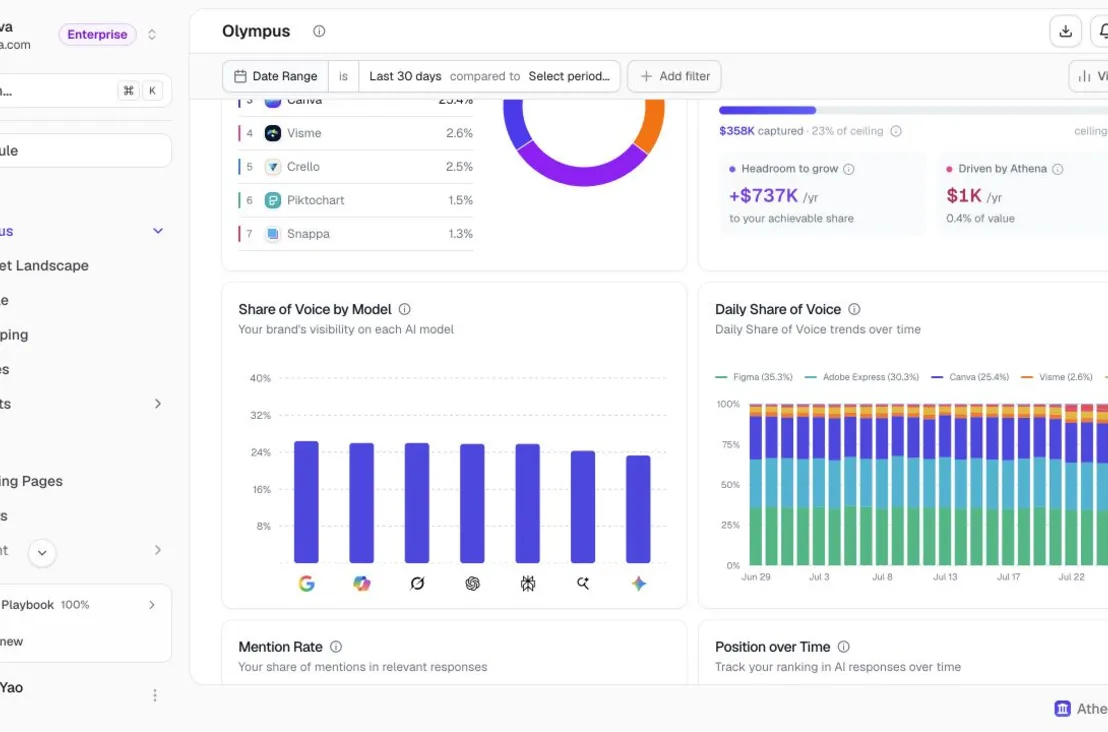
Its main difference from simpler prompt trackers is that AthenaHQ does not stop at showing where a brand appears. It also tries to estimate how likely a piece of content is to be cited and then uses that information to guide content changes.
How Does AthenaHQ Work?
AthenaHQ starts with prompt monitoring. Teams define the topics, brands, competitors, and questions they want to track, and the platform checks how different AI systems respond to those queries over time.
From those responses, AthenaHQ measures factors such as:
- Whether your brand is mentioned.
- How often competitors appear.
- Which websites and pages receive citations.
- Your relative share of voice.
- How visibility changes across AI platforms and prompt groups.
The more distinctive part of its methodology is the Athena Citation Engine, or ACE.
AthenaHQ says ACE is a machine-learning model trained on millions of AI-search results. It analyzes a piece of content and assigns a score representing the estimated probability that AI systems will cite it.
In a May 2026 validation study published by AthenaHQ, ACE was tested on 1,761 articles that had been live for at least 90 days. The company reported that content in the highest scoring decile was cited 87% of the time, compared with 38.6% for the lowest decile. AthenaHQ also reported a 0.90 correlation between ACE scores and actual citation rates. These figures come from AthenaHQ's own testing, so they should be treated as vendor-reported results.
Who Should Use AthenaHQ?
AthenaHQ is best suited to GEO teams, SEO teams, content teams, agencies, and larger brands that want both AI visibility measurement and an execution workflow within the same platform.
It can make particular sense if:
- You need to monitor visibility across several AI platforms rather than one or two.
- You want to compare your brand against several competitors.
- You need citation data rather than only mention tracking.
- Your team wants recommendations tied directly to content changes.
- You manage enough prompts and pages that manual GEO analysis would become difficult.
- You want to evaluate existing or planned content for its estimated citation probability.
How Should You Use AthenaHQ?
Start by organizing prompts around the questions that matter commercially rather than tracking every possible mention of your brand. Category searches, comparisons, recommendations, alternatives, product questions, and problem-based prompts are usually more useful than broad informational queries.
You can then use AthenaHQ to:
- Track AI visibility across ChatGPT, Gemini, Claude, Perplexity, and other supported AI platforms.
- Compare share of voice against competitors within your most important prompt groups.
- Review citation sources to see which websites AI systems repeatedly rely on.
- Find prompts where competitors receive visibility or citations while your brand does not.
- Use ACE scores to evaluate existing pages or content drafts based on their predicted citation probability.
- Review on-page and off-page GEO opportunities when trying to determine why another source is cited instead.
- Use its content workflows to revise pages that underperform across important AI queries.
- Compare performance across different AI platforms rather than assuming ChatGPT, Gemini, Claude, and Perplexity behave identically.
5. Writesonic GEO Suite
Writesonic GEO Suite combines AI visibility tracking with content, citation, and technical workflows. Instead of only showing whether your brand appears in ChatGPT, Gemini, Claude, Perplexity, Google AI Mode, and other AI platforms, it also helps teams identify why competitors are appearing, which sources are being cited, and what changes can be made to improve visibility. Writesonic currently tracks 10 AI platforms on its higher-tier plans.
How Does Writesonic GEO Work?
The process starts by configuring the topics, prompts, competitors, markets, and languages you want to track. Writesonic then monitors those prompts across AI platforms and analyzes the responses for brand mentions, citations, sentiment, competitor appearances, and share of voice.
One notable part of its methodology is how it collects AI responses. Writesonic says its visibility tracker queries AI platforms like a real user rather than relying on their APIs. This matters because API responses can behave differently from the consumer-facing versions people actually use.
The workflow can be simplified into four stages:
- Track prompts and AI responses. Writesonic checks how your brand and competitors appear across selected AI platforms.
- Find visibility and citation gaps. It identifies queries where competitors are mentioned or cited while your brand is absent.
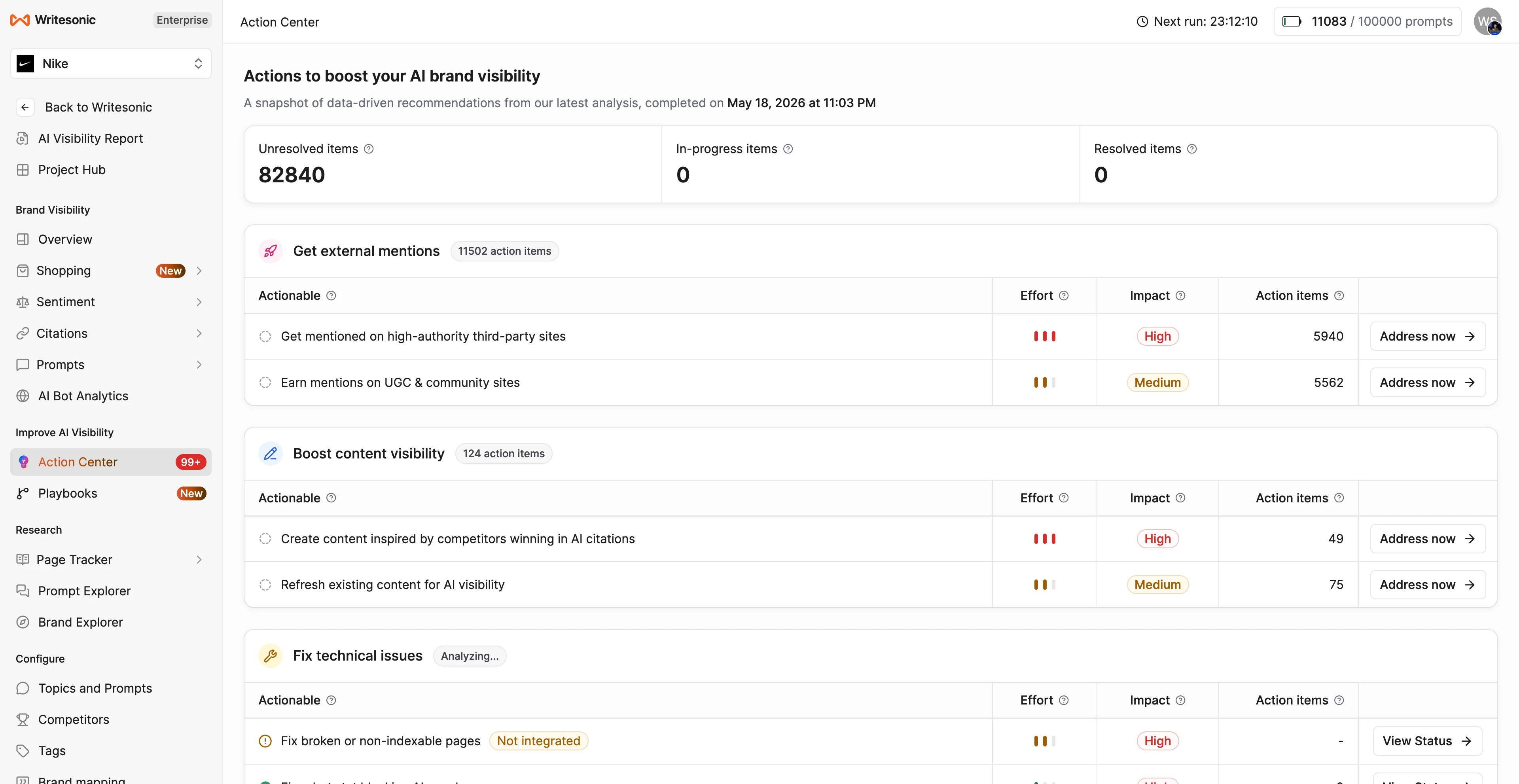
- Prioritize actions. The Action Center ranks issues such as missing content, citation opportunities, page updates, and technical problems based on their expected visibility impact.
- Make changes and continue measuring. Teams can create new content, update existing pages, work on third-party citation opportunities, and then monitor whether AI visibility changes.
Writesonic also has an AI Traffic Analytics layer that works differently from its prompt tracker. It uses server-side traffic data rather than browser analytics to identify AI crawlers visiting your website and human visitors arriving from AI platforms.
Who Should Use Writesonic GEO?
Writesonic GEO is a good fit for content teams, SEO teams, SaaS companies, agencies, and growth marketers that want GEO tracking and content execution within the same platform.
It makes particular sense if:
- Your team is already producing a large amount of SEO or editorial content.
- You want to track both brand mentions and website citations.
- You need competitor monitoring across several AI platforms.
- You want recommendations that can be converted into content tasks.
- You want to monitor AI crawlers alongside AI visibility.
- You manage several countries, languages, products, or client accounts.
How Should You Use Writesonic GEO?
Start by configuring your most commercially relevant topics and competitors. Writesonic can generate prompts using AI, but you should also manually add questions tied to product discovery, comparisons, alternatives, recommendations, and purchasing decisions.
From there, you can use the platform to:
- Track AI visibility to see how frequently your brand appears across monitored answers.
- Compare share of voice against direct competitors.
- Monitor citations to identify which domains and individual pages AI systems regularly reference.
- Check sentiment to see how AI platforms describe your brand when it appears.
- Use the Prompt Explorer to study the questions driving visibility and citations.
- Use the Action Center to prioritize missing prompts, citation gaps, content updates, and technical issues.
- Review content opportunities based on websites and page formats that are already receiving AI citations.
- Use Content Optimization to update existing pages that may not be structured well for AI citation.
- Find citation opportunities on third-party websites and connect them with outreach workflows.
- Use AI Traffic Analytics to see which AI crawlers visit your site and which platforms send human visitors.
- Segment prompts and competitors using tags when you want separate reporting for products, services, campaigns, or business units.
6. Semrush AI Visibility Toolkit
Semrush AI Visibility Toolkit extends the platform beyond traditional SEO by tracking how brands appear across AI-generated answers. It combines AI visibility measurement, prompt research, competitor tracking, citation analysis, sentiment, and technical checks within the wider Semrush ecosystem.
How Does Semrush AI Visibility Toolkit Work?
Semrush maintains a large repository of queries submitted to AI platforms. Its proprietary technology identifies branded and non-branded queries that are directly related to, or contextually associated with, a domain. That dataset is then used to measure mentions, citations, sentiment, competitors, and share of voice.
Its workflow has two main layers.
The first is broad AI visibility research. You enter a domain and Semrush identifies relevant AI queries, brand mentions, competitors, citations, and sources without requiring you to manually build the entire prompt set.
The second is Prompt Tracking. Here, you select the specific prompts you want monitored regularly across supported AI search systems. Semrush currently reports metrics such as AI Visibility, Mentions, Owned Sources, Topic Volume, and Average Position for supported platforms including ChatGPT Search, Google AI Mode, and Gemini.
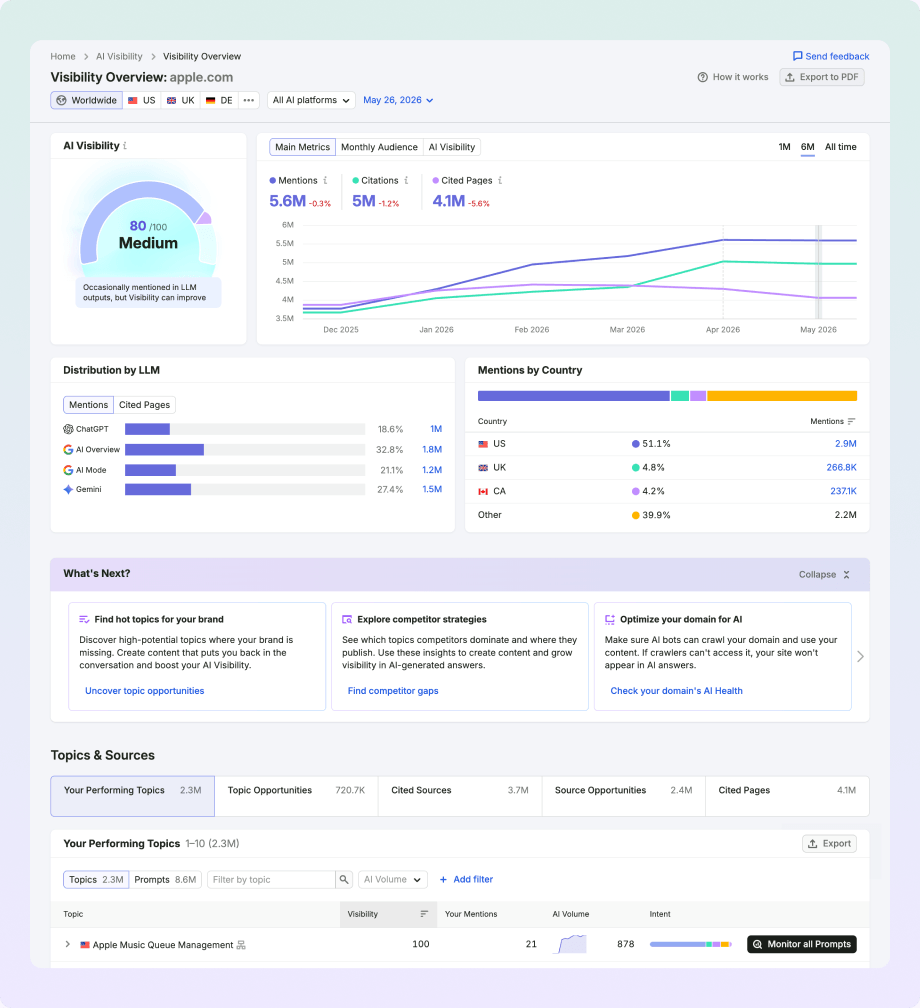
One of the headline metrics is the AI Visibility Score, which runs from 0 to 100 and reflects how often the tracked brand appears across AI platforms.
Semrush also measures Share of Voice, which represents the percentage of AI-generated brand mentions your company receives compared with competing brands in the same market.
Who Should Use Semrush AI Visibility Toolkit?
The toolkit is aimed primarily at SEO teams, marketing teams, agencies, SMBs, and mid-market companies that want AI-search measurement alongside their existing search marketing work. Semrush itself positions the product around these groups rather than only large enterprises.
It is particularly suitable when:
- Your team already uses Semrush for SEO.
- You want to compare traditional search performance and AI visibility within the same ecosystem.
- You need competitor benchmarking without manually creating hundreds of prompts.
- You want both broad market research and regular tracking of selected prompts.
- You want to study brand perception alongside citations and mentions.
- You need technical checks for issues that could stop AI crawlers from accessing important pages.
How Should You Use Semrush AI Visibility Toolkit?
A good starting point is the Visibility Overview. Use it to establish a baseline for your brand before creating a large prompt-tracking project. You can review the AI Visibility Score, mentions, citations, and cited pages to understand where your brand currently stands.
From there, use the toolkit to:
- Review Brand Performance to compare your share of voice, sentiment, and brand perception with competitors.
- Use Prompt Research to find AI queries, topics, brands, source domains, and pages connected with your market.
- Add commercially important queries to Prompt Tracking so you can monitor visibility, mentions, owned sources, and position over time.
- Run Competitor Research to find prompts and topics where competing brands receive citations but you do not.
- Examine cited pages to see which of your own URLs AI systems already reference and which content types appear most often.
- Study source domains to identify third-party websites that repeatedly influence AI answers in your category.
- Monitor sentiment and narrative drivers to see not only whether your brand appears, but also what attributes AI systems associate with it and which sources contribute to that description.
- Use AI Search Health within Site Audit to find technical issues that may interfere with AI crawlers accessing your website.
7. Ahrefs Brand Radar
Ahrefs Brand Radar is an AI visibility research and monitoring tool that shows how brands, products, people, and websites appear across AI-generated answers. It tracks mentions, citations, estimated impressions, and AI Share of Voice while connecting that data with Ahrefs' existing search and web datasets.
One of its main differences is scale. Instead of requiring you to manually create every prompt you want to monitor, Brand Radar maintains an index of more than 405 million search-backed prompts. You can search this existing dataset immediately and add custom prompts when there are specific questions you want to track regularly.
How Does Ahrefs Brand Radar Work?
Ahrefs describes the methodology behind Brand Radar as:
“Behavioral relevance + semantic coverage”
The idea is to combine questions that reflect actual search behavior with related questions needed to cover a topic more fully.
The process begins with Ahrefs' keyword database and Google's People Also Ask data. Ahrefs then expands those queries through two methods:
- People Also Ask data reflects search behavior. These questions come from searches people actually perform and the related questions they interact with on Google.
- Semantic fanout expands the topic further. This produces related sub-questions based on meaning and topic structure, including questions that may be useful for answering the original query even when they do not have large search volumes.
Ahrefs then runs these questions through supported AI interfaces and stores the resulting answers and sources. Users can search this dataset for brand mentions, citations, competing brands, domains, and other terms.
This gives Brand Radar a different model from tools built entirely around a manually selected prompt list.
Its main AI visibility metrics include:
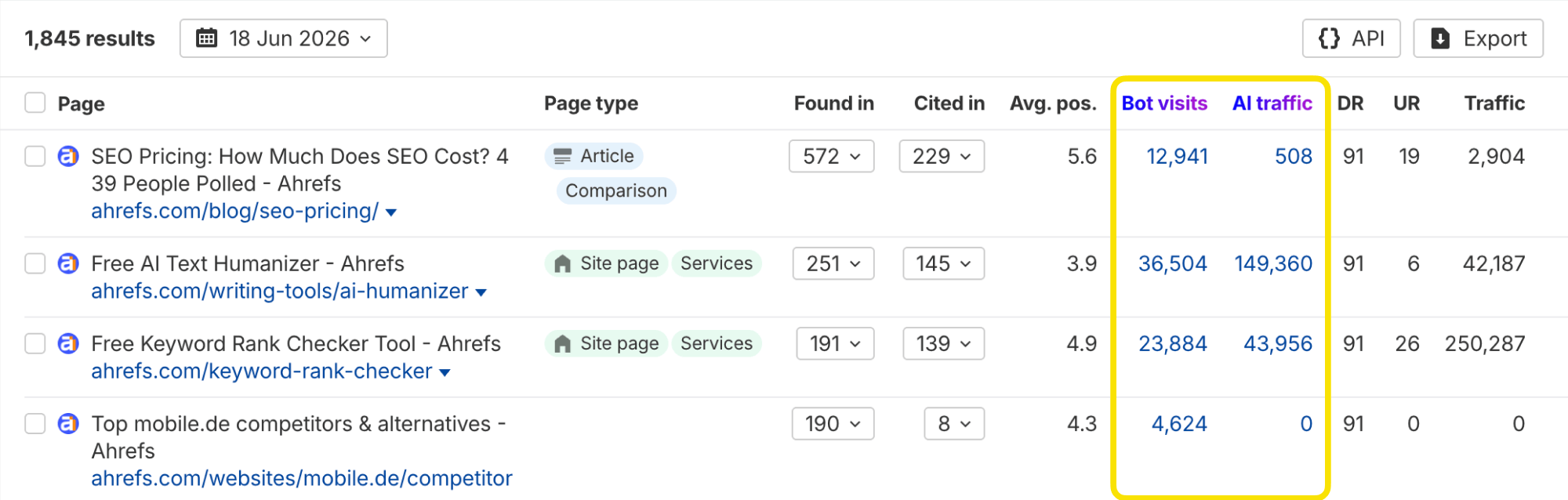
- Mentions: A mention is counted when the tracked brand appears at least once in an AI-generated response. Several appearances of the brand in one answer still count as one mention.
- Citations: A citation is counted when a page or domain is used as a cited source in an AI answer.
- Found in: Ahrefs can also record pages retrieved by an AI system while generating an answer even when those pages are not ultimately shown as citations.
- Estimated Impressions: Ahrefs models possible exposure using the Google search volume associated with prompts where a brand appears.
- AI Share of Voice: This compares a brand's estimated impressions against the other brands being tracked.
The distinction between cited and found but not cited is especially interesting. A page may be retrieved during the answer-generation process without appearing as a visible source. Brand Radar can surface both situations, giving teams another way to investigate why a page is being considered but not selected as the final citation.
Ahrefs is also transparent about a limitation of its methodology. Estimated Impressions use Google search volume as a modeling input, but Ahrefs does not claim that Google search volume directly represents how frequently the same question is asked inside an AI platform. These figures should therefore be treated as modeled visibility indicators rather than actual audience counts.
Who Should Use Ahrefs Brand Radar?
Ahrefs Brand Radar is a good fit for SEO teams, content marketers, competitive research teams, agencies, and existing Ahrefs users that want to study AI visibility at a much larger scale than a small manually maintained prompt list.
It can be particularly useful if:
- You want to research AI visibility before deciding which prompts deserve ongoing monitoring.
- You already use Ahrefs for keywords, backlinks, competitor research, or content analysis.
- You want to compare several brands without creating separate projects for every competitor.
- You need to identify heavily cited domains and pages across an entire category.
- You want to connect AI visibility with search demand and broader web visibility.
- You want to investigate the hidden fanout queries AI systems may use when producing an answer.
How Should You Use Ahrefs Brand Radar?
A useful way to start is by entering your website and allowing Ahrefs to identify your brand and likely competitors automatically. You can adjust those entities manually before moving into deeper analysis.
From there, Brand Radar can be used to:
- Compare AI Share of Voice to see how your estimated visibility compares with competing brands.
- Review brand mentions to find the AI answers where your company currently appears.
- Analyze citations to see which of your own pages AI systems reference.
- Find top cited domains and pages to see which external sources repeatedly influence answers in your category.
- Study Found but not cited pages to identify URLs AI systems retrieve but do not ultimately show as visible sources.
- Compare performance across individual AI platforms instead of combining everything into one visibility number.
- Use custom prompts for important questions that may not be adequately represented in Ahrefs' existing index. Custom prompts can be checked as frequently as daily.
- Review fanout queries to see the additional searches AI systems generate while answering broader prompts. Ahrefs currently exposes this data for ChatGPT and Perplexity.
- Use Search Demand to compare AI visibility with conventional branded and category search behavior.
- Check Web Visibility to see where brands are being discussed across websites outside AI answers.
- Save reports to track the same brand and competitor sets over time.
- Feed Brand Radar data into Ahrefs' Report Builder, API, or Looker Studio connector when regular reporting is required.
8. WordLift
WordLift is different from most GEO tools on this list. While platforms such as Profound, Otterly.AI, and Ahrefs primarily measure what appears in AI-generated answers, WordLift focuses heavily on making a website's information easier for search engines and AI systems to identify, connect, and reuse.
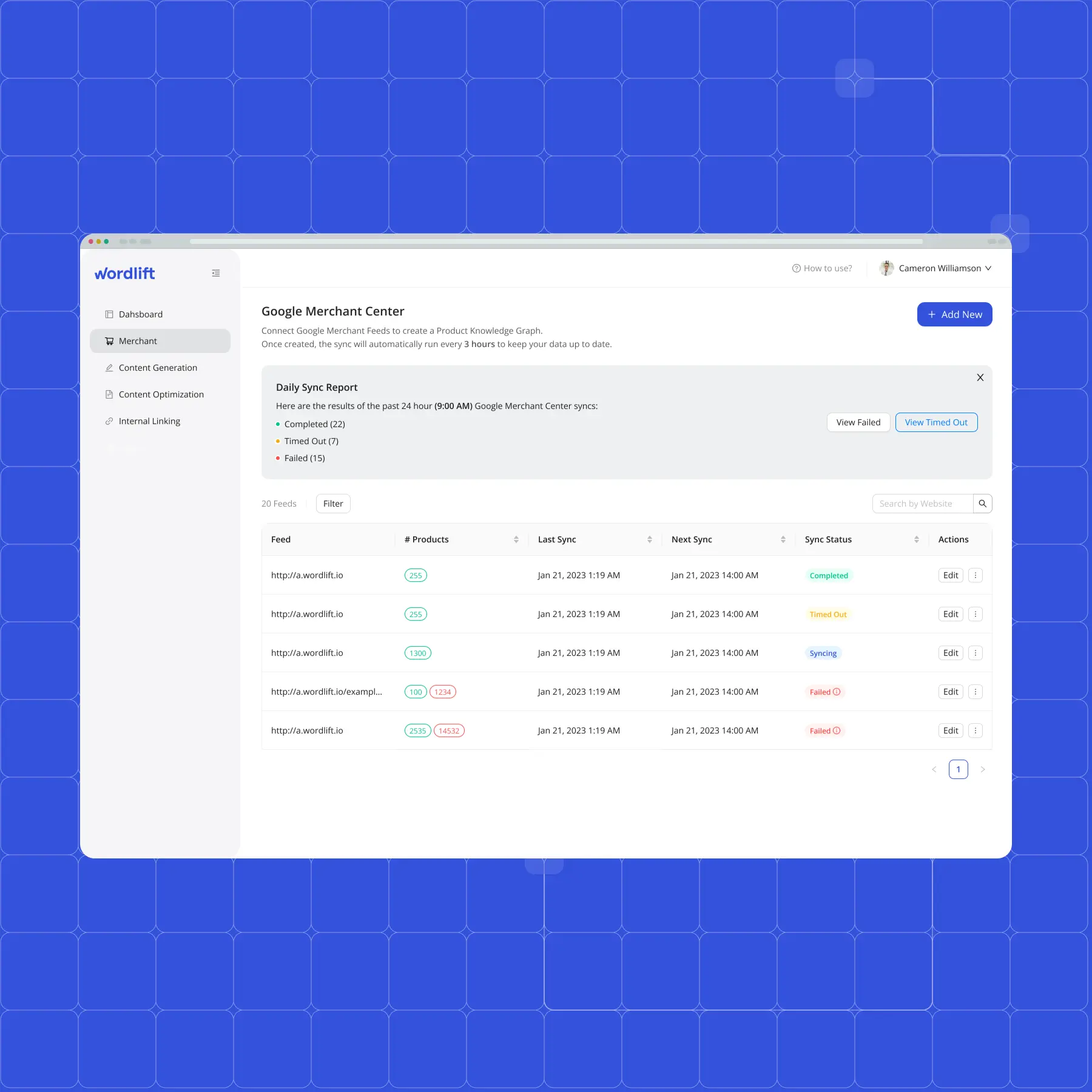
WordLift currently positions itself as an AI Discovery Platform for Brands. Its visibility stack includes Data Connect, Ontologies, Dynamic Knowledge Graphs, and Markup Optimization, with a separate AI Visibility Audit for checking how brands appear across AI search.
How Does WordLift Work?
WordLift's methodology is based largely on entities and knowledge graphs rather than keywords alone.
A conventional webpage contains information that humans can interpret from the text. WordLift adds a structured layer that explicitly describes what those things are and how they relate to each other. A company, product, person, location, category, or service can become an entity, with defined relationships connecting it to other entities.
The basic process looks like this:
- Connect the data. WordLift brings information from the website and other business data sources into a common data layer.
- Define entities and relationships. Ontologies are used to organize the concepts that matter to the business and describe how they connect.
- Build a Dynamic Knowledge Graph. The entities and relationships are stored as connected structured knowledge rather than isolated pieces of webpage copy.
- Publish machine-readable information. Schema.org and linked-data markup can communicate those entities and relationships to search engines and AI systems.
- Test AI visibility. WordLift's AI Visibility Audit can check selected category questions across systems such as Google AI Mode, ChatGPT, Perplexity, and Copilot to see where the brand is cited and where competitors appear instead.
WordLift has also built a Query Fan-Out API designed to simulate the query fan-out process used in AI search. This can help teams examine the secondary searches that may sit behind a broader AI query rather than optimizing only for the original question.
Its approach to GEO goes beyond simply adding Schema.org markup. In research published by WordLift in March 2026, the company argued that structured data works better when it forms part of a connected entity layer that AI systems can navigate and retrieve evidence from. Its experiment reported answer-accuracy improvements of up to 29.8% in the tested setup. These numbers come from WordLift's own research, so they should be treated as vendor-reported experimental results rather than a guaranteed outcome for every website.
Who Should Use WordLift?
WordLift is particularly suited to enterprise websites, ecommerce companies, publishers, travel websites, large content sites, and SEO teams managing many products or entities.
It makes the most sense when:
- Your website contains hundreds or thousands of products, people, locations, categories, or other connected entities.
- The same business information appears across multiple pages or data sources and needs to remain consistent.
- You want to build a Product Knowledge Graph for a large ecommerce catalogue.
- Schema markup has become difficult to manage manually.
- You want AI systems to interpret relationships between your products, categories, brands, services, and other entities.
- Your GEO plan involves technical data architecture as well as content production.
- You want to combine AI visibility checks with structural changes to the website.
How Should You Use WordLift?
The best way to use WordLift is to start with your most important entities, not with every page on the website.
For example, an ecommerce business could begin with its brand, product categories, products, product attributes, and related topics. A publisher might instead start with authors, subjects, organizations, locations, and articles.
From there, you can use WordLift to:
- Use Data Connect to bring relevant website and business information into a structured data layer.
- Create ontologies that define the entities and relationships specific to your industry.
- Build a Dynamic Knowledge Graph connecting products, brands, authors, topics, locations, and other entities.
- Deploy Schema.org markup so key information can be represented in a machine-readable format.
- Connect entity pages internally so machines can move between related pieces of information rather than encountering isolated pages.
- Keep entity identifiers and business facts consistent across the knowledge graph.
- Add source and provenance information where factual accuracy is important.
- Run an AI Visibility Audit to see whether your brand is recognized and cited for important category questions.
- Compare your citations with competing brands and look for structural gaps rather than treating every GEO problem as a writing problem.
- Use Query Fan-Out analysis when you want to see the secondary questions that may contribute to an AI-generated answer.
9. InLinks
InLinks approaches GEO from the entity, topical structure, and internal linking side rather than functioning primarily as an AI mention tracker. It analyzes what the pages on a website are actually about, maps those pages to known entities, and then uses that information for content optimization, internal linking, and structured data.
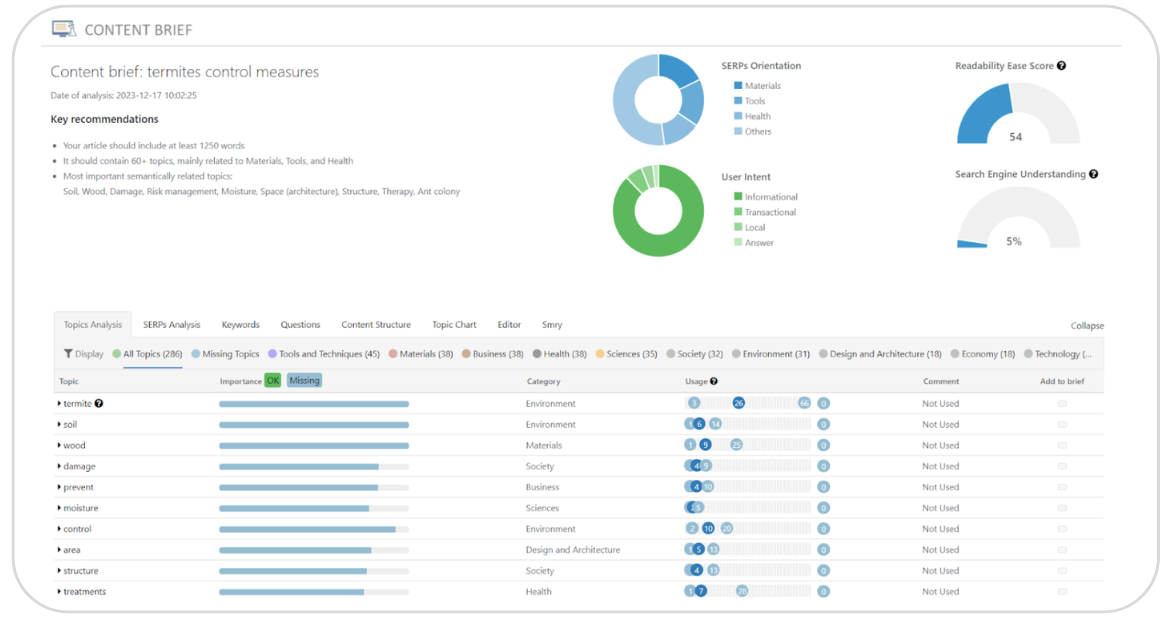
This makes InLinks useful when the problem is not simply “How often does ChatGPT mention us?” but “Can search engines and AI systems clearly identify what our website covers and how its pages relate to one another?”
How Does InLinks Work?
The methodology starts with a proprietary semantic analyzer and knowledge graph. Instead of treating a page as a collection of keyword strings, InLinks identifies the entities discussed on the page and connects them with concepts in its knowledge graph.
Its technical documentation says the InLinks Knowledge Graph uses a semi-oriented graph with unidirectional semantic relationships between entities. This lets the platform model how one concept relates to another rather than relying only on exact word matches.
That entity analysis then feeds several parts of the platform:
- Content analysis: InLinks identifies the main entities and topics within a page and compares them with the concepts expected around the target subject.
- Content recommendations: It identifies relevant semantic topics, search intent, and missing concepts that may need to be covered.
- Internal linking: InLinks looks for pages that discuss the entity associated with another page and creates contextual internal-link opportunities. It can also account for synonyms rather than requiring an exact-match anchor.
- Schema automation: Entity relationships identified by the platform can be represented through structured data, helping machines identify what a page discusses.
- Topic planning: InLinks can crawl a site's existing pages, identify its main topics, group them into semantic clusters, and identify related clusters that may be missing. It then combines those clusters with Google Suggest data to find relevant keywords and questions.
In 2026, InLinks also introduced EntityMap, a feature aimed more directly at AI search. The idea is to provide AI systems with a clearer representation of what a website knows and how its topics connect, extending the platform's entity-based approach into AI discovery.
Who Should Use InLinks?
InLinks is a good fit for SEO teams, content teams, publishers, agencies, and websites with a large number of related informational pages.
It can be particularly useful when:
- Your website contains hundreds or thousands of articles that need stronger internal connections.
- You want to organize content around entities and topics rather than isolated keywords.
- Internal linking has become difficult to manage manually.
- You want schema markup without creating every relationship manually.
- You need to identify topical gaps across an existing content library.
- Your GEO strategy includes making site structure easier for machines to interpret, not just tracking AI mentions.
- You want to build stronger relationships between category pages, supporting articles, product pages, and other related content.
It is less suited to a company whose main requirement is daily monitoring of brand mentions across ChatGPT, Gemini, and Perplexity. For that use case, a dedicated visibility tracker such as Profound or Otterly.AI would usually make more sense.
How Should You Use InLinks?
Start by importing the important pages from your website into an InLinks project. The platform can then crawl those pages and identify the entities and topics associated with them.
From there, you can use InLinks to:
- Run entity-based content analysis to see which topics and concepts are present on a page.
- Use content optimization recommendations to identify missing semantic topics and questions that may need to be addressed.
- Create topic clusters based on the entities already covered across your website.
- Identify missing clusters where your existing content does not cover related areas of a subject.
- Automate internal linking between pages that discuss related entities rather than manually searching for every linking opportunity.
- Review proposed anchor text and linking opportunities before publishing them.
- Add schema markup based on the entities identified within your content.
- Use its keyword and topic research workflow to combine entity clusters with relevant Google Suggest questions.
- Use EntityMap when you want to present the topical structure of the website more clearly for AI systems.
10. HubSpot AEO Grader
HubSpot's AEO Grader, previously called AI Search Grader, is a free diagnostic tool for checking how a brand is represented across ChatGPT, Perplexity, and Gemini. Unlike platforms built for continuous prompt monitoring, the Grader is designed primarily as a one-time assessment that gives marketers a baseline for AI visibility and brand perception.
How Does HubSpot AEO Grader Work?
The AEO Grader evaluates a brand across 5 scored dimensions:
- Sentiment Analysis looks at whether AI systems describe the brand positively, negatively, or neutrally.
- Presence Quality measures the depth and substance of how the brand appears in AI-generated answers.
- Brand Recognition assesses how clearly AI systems identify the brand, what it does, and its position within the market.
- Share of Voice compares how frequently the brand appears relative to competing companies.
- Market Competition examines how the brand is positioned against competitors in AI-generated responses.
HubSpot runs its assessment across ChatGPT, Perplexity, and Gemini and combines the results into a score out of 100. The report also provides a written interpretation of how the brand is currently represented.
Rather than requiring the user to create and run a large collection of prompts manually, HubSpot handles the prompt engineering behind the assessment. The company describes the tool as a way to contextualize how a brand currently performs in AI search without requiring specialist knowledge of prompt design.
Who Should Use HubSpot AEO Grader?
The AEO Grader is best suited to founders, marketing managers, content teams, SEO teams, and smaller businesses that want a quick check of their current AI-search position without committing to paid GEO software.
It makes sense if:
- You have never measured your brand's AI visibility before.
- You want an initial score that can act as a baseline.
- You want to compare how AI systems perceive your company and its competitors.
- You need a free tool before deciding whether dedicated GEO monitoring is worth paying for.
- You want to check sentiment as well as brand presence.
- You want a quick report that can be shared internally.
How Should You Use HubSpot AEO Grader?
The best way to use the Grader is as a starting benchmark rather than your entire GEO reporting system.
Start by running your own brand and recording the overall score. Then use the individual sections of the report to identify where the weaker areas sit.
You can use it to:
- Review your overall AI-search score to establish a starting point.
- Check sentiment to see whether AI systems describe your brand positively, negatively, or neutrally.
- Review Presence Quality to assess whether AI systems can discuss your company with enough detail.
- Check Brand Recognition to see whether the models clearly identify what your company does and where it fits in the market.
- Compare Share of Voice to determine how frequently your brand appears relative to competitors.
- Review Market Competition to see which competing companies have stronger representation.
- Run the assessment again for major competitors where appropriate so you can compare how AI systems describe different companies in your category.
- Export or record the report so you have a baseline for future GEO work.
Frequently Asked Questions
What is a GEO tool?
A GEO tool helps you measure or improve how a brand, website, or piece of content appears in AI-generated answers. Depending on the platform, this may include tracking brand mentions, citations, prompt visibility, share of voice, sentiment, competitor appearances, AI crawler activity, or content structure.
Some GEO tools mainly focus on measurement, while others focus on content, entities, schema, or technical accessibility. This is why two tools described as GEO platforms can have very different feature sets.
What is the difference between GEO tools and SEO tools?
SEO tools are traditionally built around search engines and metrics such as keyword rankings, backlinks, organic traffic, technical issues, and search volume.
GEO tools focus more on how information appears inside AI-generated answers. Common GEO metrics include:
- Brand mentions across AI platforms.
- Website and page citations.
- Prompt-level visibility.
- AI share of voice.
- Competitor mentions.
- Citation gaps.
- Brand sentiment.
- AI crawler activity.
- AI referral traffic.
There is considerable overlap between the two. Ahrefs and Semrush, for example, now provide both conventional SEO data and AI visibility measurement.
What metrics should you track for GEO?
Start with metrics that show both visibility and source selection.
Brand mentions tell you whether your company appears, while citations show whether your website is being used as a source. Share of voice helps put those numbers in context by comparing them with competitors.
A practical GEO dashboard can include:
- AI visibility.
- Brand mentions.
- Citation frequency.
- Number of cited pages.
- Share of voice.
- Prompt coverage.
- Competitor visibility.
- Citation gaps.
- Sentiment.
- AI referral traffic.
You do not need every available metric. Track the ones connected to the questions and buying journeys that matter to your business.
Do you need both SEO and GEO tools?
For most businesses investing seriously in organic discovery, yes.
SEO tools tell you how pages perform across conventional search. GEO tools tell you how brands and sources appear inside AI-generated answers. A page could rank well on Google but rarely receive AI citations, while another page could become a common AI source without holding a top traditional ranking for every related query.
Using both gives you a better view of how people discover your brand across search engines and AI interfaces.
Can GEO tools guarantee that ChatGPT, Gemini, or Perplexity will cite your website?
No. GEO tools can identify patterns, measure visibility, find citation gaps, and recommend changes that may make content easier to retrieve or use. They cannot control which sources an AI platform chooses for a particular answer.
AI-generated responses can also vary by model, location, prompt wording, retrieval method, freshness, and platform updates. GEO should therefore be treated as an ongoing measurement and optimization process rather than a guaranteed ranking formula.
Are GEO tools only useful for large companies?
No. The type of tool you need usually changes with the size of the program.
A smaller company may start with a free assessment such as HubSpot AEO Grader or a focused prompt-monitoring platform such as Otterly.AI. A larger company monitoring hundreds or thousands of prompts across regions may need platforms such as Profound or AthenaHQ.
The main question is not company size alone. It is how many brands, competitors, prompts, markets, pages, and AI platforms you need to manage.