

While comparing AI writing tools, look beyond how quickly they can generate text. Writing quality, context handling, research support, editing capabilities, brand controls, long-form content support, SEO functionality, integrations, and collaboration features all matter. A tool that works well for a solo blogger may not be the right choice for a marketing team managing hundreds of assets across multiple campaigns.
In this article, we picked 10 best AI content writing tools and compared them based on multiple factors to help you pick the most suitable one for your workflow.
How We Selected the Best AI Writing Tools
For creating this list, we considered the following factors:
- Writing quality: The tool should generate clear, coherent copy that does not require extensive rewriting before it becomes usable.
- Context handling: We considered how well each platform can work with long instructions, previous conversations, uploaded files, brand information, or other source material.
- Research support: Tools received more consideration when they could work with current web information, uploaded documents, SERP data, or supplied references.
- Long-form writing: We looked at whether the tool can maintain structure and context across articles, reports, guides, and other longer formats.
- Editing capabilities: Rewriting, shortening, expanding, paraphrasing, grammar correction, and tone adjustments were considered alongside first-draft generation.
- Brand controls: For team-focused platforms, we considered features such as brand voice, terminology rules, style guides, approved knowledge, and reusable instructions.
- Marketing functionality: We looked at how well each tool supports formats such as ads, landing pages, email campaigns, product copy, and social content.
- SEO support: Tools such as Frase and Writesonic were also assessed on SERP research, content briefs, topic coverage, optimization, and search-focused workflows.
- Workflow support: We considered whether users can turn repeated writing tasks into templates, agents, projects, or automated processes.
- Collaboration: Shared workspaces, team settings, permissions, centralized brand rules, and review workflows were more relevant for platforms aimed at larger organizations.
- Ease of use: A tool should make the writing process easier rather than adding unnecessary setup for the intended user.
- Human editing required: We also considered how much checking, rewriting, fact verification, and editorial work is usually needed before the output can be published.
The best AI writing tool depends on what you actually need it to do. Some tools are better at generating first drafts, while others are stronger at research, rewriting, brand consistency, SEO, or team workflows. Before choosing one, consider how it fits into your existing content process rather than judging it only by the quality of a single output.
Here is a quick view of where the tools in this list generally fit:
Now, let’s cover top 10 AI writing tools in detail:-
1. ChatGPT
ChatGPT is one of the most flexible AI writing tools because it is not built around a single content format. You can use it to brainstorm ideas, research a topic, create an outline, draft an article, rewrite individual sections, edit an existing document, or turn one piece of content into several formats. ChatGPT also supports web search and file uploads, which makes it possible to bring source material directly into the writing process rather than relying only on what the model already knows.
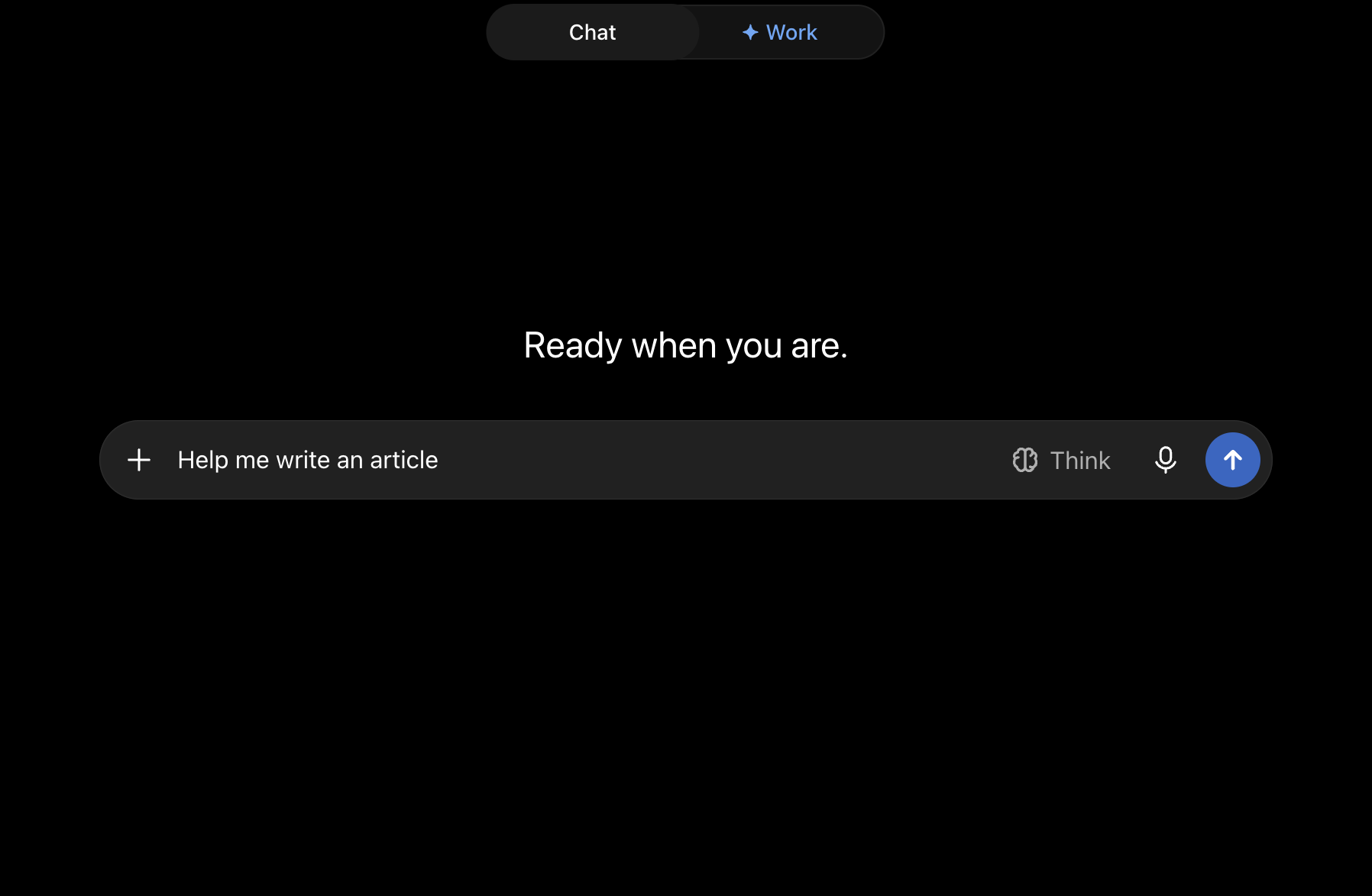
How Does ChatGPT Work?
ChatGPT is built on OpenAI's GPT models. At a basic level, the model processes your instructions and available context, then generates text by predicting appropriate sequences of words based on patterns learned during training and further post-training.
The conversational format is an important part of how ChatGPT works. You do not need to provide every instruction in one large prompt. You can generate an outline, ask it to change the structure, draft one section, point out problems, provide additional material, and continue refining the same piece through follow-up instructions. OpenAI originally designed ChatGPT around this back-and-forth interaction rather than treating each prompt as an isolated request.
For writing tasks, ChatGPT can also work with information beyond the immediate prompt:
- Web search can bring current information into the conversation when your article requires recent facts or sources.
- File uploads allow you to provide documents, PDFs, spreadsheets, images, and other reference material for analysis or writing.
- Projects can keep related chats, files, and instructions together, which is useful when you are working on a content project over several sessions.
- Memory can retain relevant preferences and context across conversations when enabled, reducing the need to repeat certain instructions. OpenAI updated ChatGPT's memory system in June 2026.
- Deep research can carry out multi-source research for topics that need more than a quick web search.
The quality of the final writing still depends heavily on the instructions, reference material, and review process. For factual or research-heavy content, generated claims should still be checked against reliable sources before publication.
Who Should Use ChatGPT?
ChatGPT works well for users who want one AI assistant that can cover multiple parts of the writing process rather than a tool built for a single task.
It can be particularly useful for:
- Content writers who want help with research, outlines, drafts, rewrites, and editing.
- Content marketers creating blogs, landing pages, newsletters, ebooks, and campaign content.
- SEO teams that want to turn keyword research and SERP findings into briefs, structures, and drafts.
- Founders and small teams that need to create different types of business content without maintaining several separate writing tools.
- Editors who want to restructure, shorten, simplify, or review drafts.
- Researchers working with multiple documents or sources before converting their findings into written content.
How Should You Use ChatGPT for Writing?
ChatGPT works better as part of a staged writing process than as a one-click article generator. Instead of asking it to "write a 2,000-word article," give it control over smaller parts of the process.
Some useful ways to work with it include:
- Research the topic before drafting. Ask ChatGPT to search for recent information, competing viewpoints, statistics, examples, and primary sources before deciding what the article should cover.
- Create the structure separately. Provide the target keyword, audience, search intent, desired length, and topics that must be covered, then ask for an outline before generating prose.
- Write one section at a time. This gives you more control over depth, repetition, tone, and structure than generating an entire long-form article at once.
- Provide your own reference material. Upload research reports, product documentation, interview transcripts, briefs, or existing articles so the draft is based on material you trust.
- Use Projects for ongoing content work. Store related instructions and source files together when several articles share the same audience, product information, or editorial rules.
- Edit with specific instructions. Instead of asking ChatGPT to "make this better," tell it exactly what needs to change, such as removing repetition, simplifying sentences, adding examples, or making the section more concise.
- Repurpose finished content. A completed article can be converted into email copy, social posts, FAQs, summaries, sales material, or other formats without starting the writing process again.
- Run a final review separately. Ask ChatGPT to identify unsupported claims, repeated ideas, weak transitions, missing sections, and sentences that sound generic before publishing.
2. Claude
Claude is an AI assistant developed by Anthropic that can help with writing, research, analysis, editing, and working with large amounts of reference material. For writers, one of its main strengths is its ability to work through long documents and detailed instructions while keeping the output connected to the source material. Anthropic positions Claude as a general-purpose assistant for language, reasoning, and analysis rather than a dedicated copywriting platform.
This makes Claude particularly useful for long-form work. You can upload reports, research material, existing drafts, or brand documentation and then ask Claude to turn that information into outlines, articles, summaries, or revised drafts.

How Does Claude Work?
Claude is powered by Anthropic's family of large language models. Like other generative AI models, it processes your prompt together with the context available in the conversation and generates a response based on that information.
Anthropic also uses an approach called Constitutional AI as part of Claude's training. Instead of relying only on human feedback to guide model behaviour, Anthropic developed a set of written principles that can be used during training to guide how Claude responds. Anthropic published an updated Claude constitution in January 2026.
For writing workflows, several Claude features are particularly useful:
- Projects let you create separate workspaces with their own conversations and knowledge bases. You can upload documents, text, code, and other files that Claude can use as context across chats within that project.
- Web search allows Claude to find current information online and use web sources while answering questions. When web search is enabled, Claude can also retrieve content from URLs you provide.
- Artifacts provide a separate workspace for longer outputs that you may want to continue editing or referring to outside the normal chat flow.
- File-based analysis makes it possible to work from source documents instead of relying entirely on a prompt.
- Conversation-based iteration allows you to revise an outline, rewrite sections, change tone, remove repetition, or add missing information through follow-up instructions.
The practical benefit is that Claude can be used more like a writing partner than a single-prompt generator. You can provide the source material first, establish the structure, and then develop the article through several rounds of drafting and editing.
Who Should Use Claude?
Claude is a good fit for users who regularly work with long or source-heavy content.
It can be particularly useful for:
- Content writers creating long-form articles, guides, reports, and ebooks.
- Editors who need to review or restructure large drafts without breaking them into many smaller pieces.
- Content marketers working from research reports, customer interviews, product documents, or internal material.
- Researchers who want to analyze several documents before turning their findings into written content.
- Founders and subject-matter contributors who have raw notes or source material but need help turning them into a readable draft.
- Teams that want project-specific knowledge and instructions available across multiple writing conversations.
How Should You Use Claude for Writing?
Claude works particularly well when you give it enough source material before asking it to write. A useful workflow is to separate research, organization, drafting, and editing instead of requesting a finished article immediately.
You can use it in several ways:
- Upload your research before creating the outline. Give Claude reports, interviews, notes, competitor material, or product documentation and ask it to identify the topics worth covering.
- Use Projects for related content. A Project can contain background documents and instructions that apply across multiple conversations, making it useful for a blog, campaign, or client account.
- Build long articles section by section. Start with the outline, decide what each section needs to answer, and then draft each part separately.
- Ask Claude to work only from supplied material when accuracy matters. This can help reduce situations where the model fills gaps with unsupported information.
- Use web search for current topics. Claude can search for recent information and provide sources when the article depends on current data or developments.
- Use Artifacts for longer drafts. Longer pieces can be placed in a dedicated workspace where they are easier to revise while the conversation continues alongside them.
- Compare a draft against your source material. Ask Claude to identify claims that are not supported by the documents you provided.
- Use targeted editing instructions. Ask it to remove repetition, shorten paragraphs, simplify language, improve transitions, or rewrite sections without changing the underlying information.
- Turn one source into multiple formats. A report or article can be converted into summaries, emails, social posts, FAQs, or sales material.
3. Jasper
Jasper is an AI platform built mainly for marketing teams. While it can generate blog posts, emails, social copy, product descriptions, and other written content, its bigger focus is helping teams create content consistently across campaigns while following brand rules. Jasper now positions itself around AI agents and marketing workflows rather than only AI text generation.
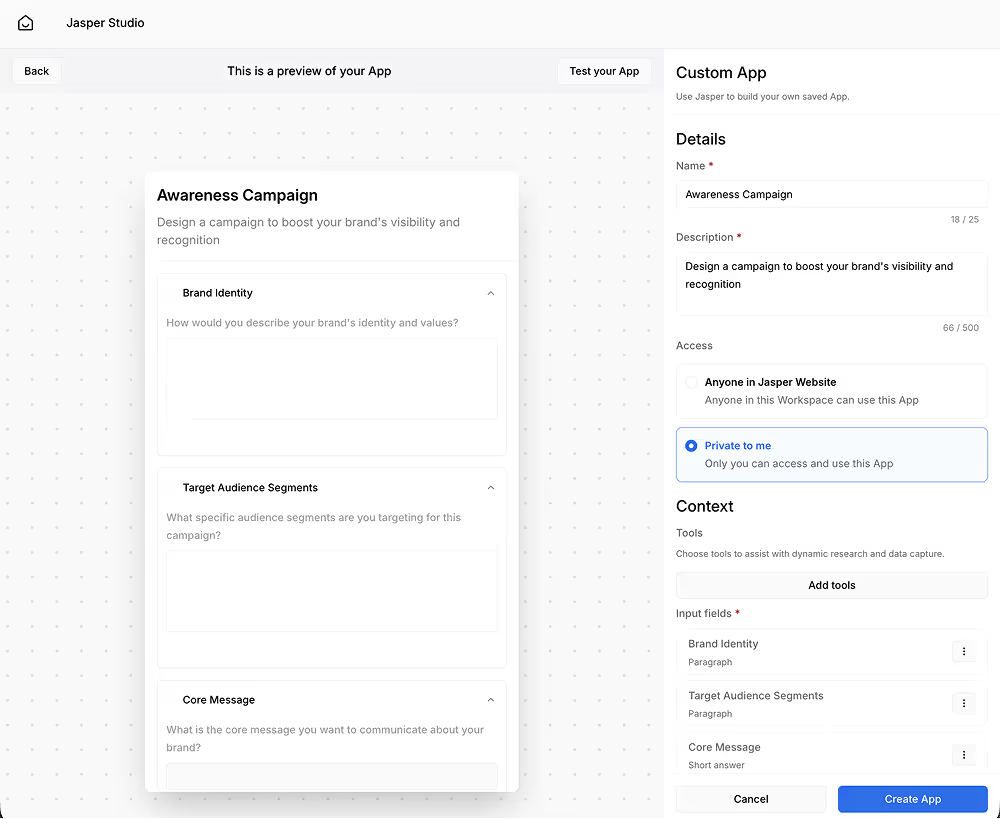
That makes Jasper different from general-purpose assistants such as ChatGPT and Claude. Instead of starting with a blank conversation every time, teams can give Jasper information about their brand, products, audience, terminology, and writing style, then apply that context across different projects and content formats.
How Does Jasper Work?
Jasper does not depend on one language model for every task. Its API documentation describes the platform as LLM-agnostic, meaning Jasper can work with different underlying language models while adding its own marketing, brand, and workflow layers around them.
For writing, much of this context is managed through Jasper IQ. Teams can define Brand Voice, Knowledge, audiences, and style rules that Jasper can apply when generating content.
The process broadly works like this:
- You provide Jasper with information about your company, products, customers, and existing content.
- Jasper uses that material to create or apply brand-specific context.
- You select the audience, Brand Voice, Knowledge, and style rules needed for a project.
- Jasper combines your instructions with this context when generating content.
- Teams can then use Jasper's writing tools, agents, or automated workflows to produce and revise content.
Brand Voice is one of the main parts of this process. You can provide examples of existing writing, and Jasper analyzes elements such as tone, style, and recurring characteristics to create a reusable voice.
Knowledge Base provides the factual background Jasper should use. It can contain material such as product information, white papers, content briefs, company values, and website content.
Style Guides provide more specific writing rules. Teams can set a style guide at the project or agent level so generated copy follows the same editorial requirements.
This combination is what makes Jasper particularly useful for companies where AI-generated content needs to follow predefined rules rather than simply sound well written.
Who Should Use Jasper?
Jasper is best suited to marketing teams that produce a large amount of content and need stronger control over how that content is created.
It can be a good choice for:
- Content marketing teams producing blogs, guides, landing pages, and other recurring content.
- Brand teams that need generated copy to follow specific terminology, voice, and style rules.
- Demand generation teams creating content across emails, landing pages, ads, and campaigns.
- Marketing operations teams building repeatable AI-assisted production processes.
- Larger organizations where several employees or agencies create content for the same brand.
- Multi-brand companies that need separate brand information and writing rules for different products or business units.
How Should You Use Jasper for Writing?
Jasper becomes more useful when you set up your brand information before generating large amounts of copy. Simply treating it as a blank AI chatbot does not make full use of what the platform is built to do.
Some practical ways to use Jasper include:
- Set up Brand Voice from existing content. Provide examples of published articles, website copy, or other material that accurately represents how your company writes. Jasper can use these examples to build a reusable Brand Voice.
- Build a Knowledge Base. Add product information, white papers, positioning documents, content briefs, and other approved material so Jasper has company-specific context available while writing.
- Create separate settings for different audiences. A technical buyer, small-business owner, and enterprise decision-maker may require different messaging even when the underlying product is the same.
- Use Style Guides to set editorial rules. Style Guides can be selected in Chat, agent settings, and project settings, helping teams control terminology and other writing conventions.
- Create campaign assets from shared context. Instead of writing an email, landing page, ad, and social post separately, teams can generate related material using the same campaign information and brand settings.
- Build repeatable workflows with Jasper Studio. Jasper Studio provides a no-code environment for creating marketing workflows that connect data, tasks, and output rules.
- Use Jasper Grid for content at scale. Jasper Grid provides a spreadsheet-like interface for producing many content variations while applying brand rules across them.
- Review generated content before publishing. Brand settings can improve consistency, but factual accuracy, originality, positioning, and final editorial quality should still be checked by a human.
4. Writesonic
Writesonic started as an AI writing platform, but its current product goes much further into SEO, GEO, AI search visibility, and content execution. For writers and marketing teams, its main strength is that writing is connected to research, search performance, brand voice, content planning, and optimization rather than being treated as a standalone generation task.
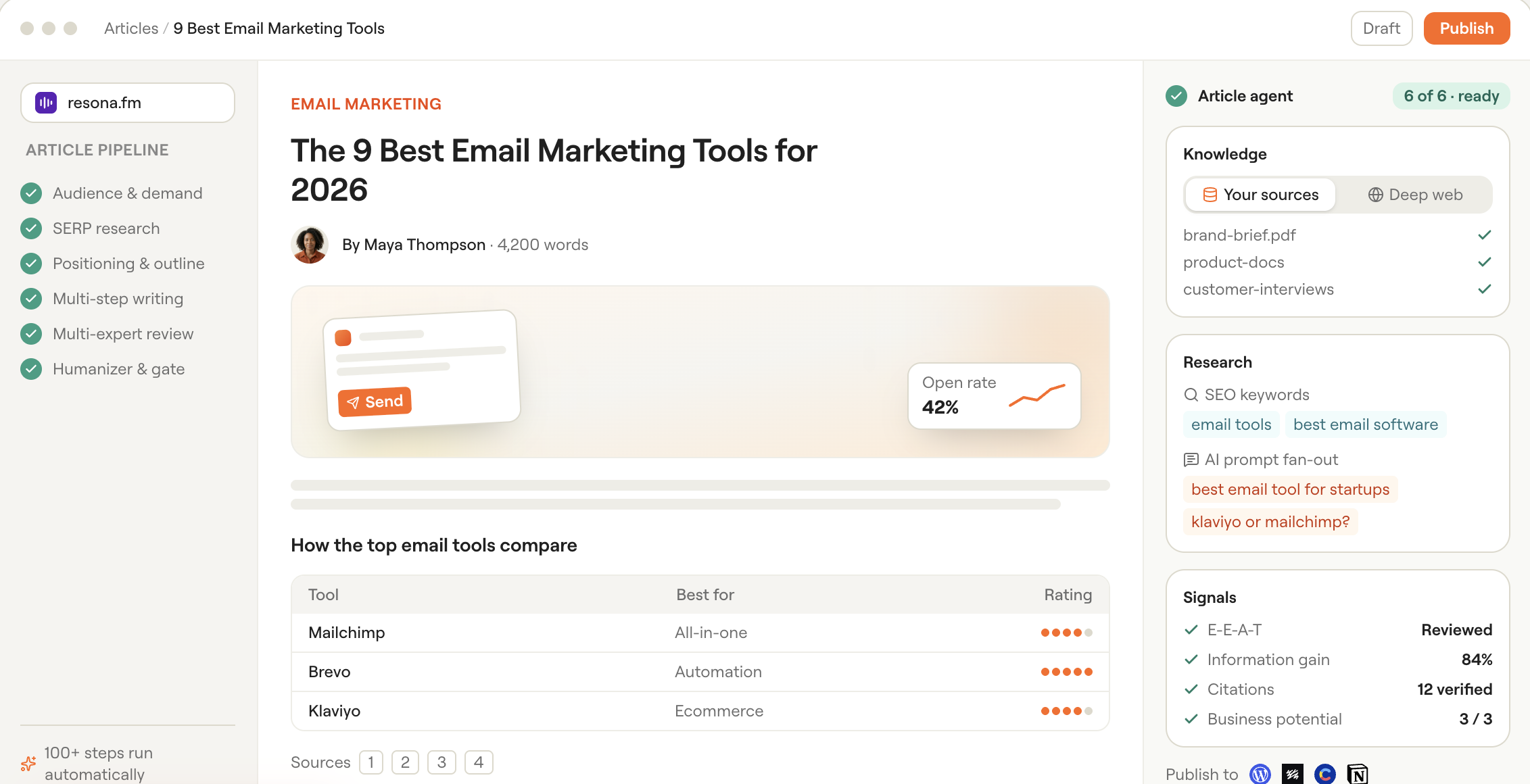
Its current content stack includes an AI Article Writer, AI Content Agent, Content Strategy Planner, SEO AI Agent, research tools, content optimization tools, and repurposing features. Writesonic also connects content creation with its broader AI search platform, so teams can identify content gaps and then create or update pages within the same system.
How Does Writesonic Work?
Writesonic combines generative AI with search data, competitor research, brand information, content frameworks, and optimization rules.
For long-form content, its current Article Writer v10 uses more than 80 processing steps and 11 expert frameworks, according to Writesonic. The platform also supports content refresh workflows designed for both traditional search and AI-generated answers.
The writing process can include several layers:
- You provide a topic, keyword, target market, or existing page.
- Writesonic can research keywords, competing pages, search intent, and related opportunities.
- The system builds a structure based on the content type and research.
- Your writing style and brand information can be applied to the output.
- The article is generated and passed through additional review and polishing steps.
- You can then optimize or refresh the page for search and AI visibility.
Its AI Content Agent follows predefined structures for different formats, applies a brand's writing style, uses an additional review stage, and performs a final polishing pass. It supports formats beyond articles, including LinkedIn posts, sales emails, and other marketing assets.
Writesonic's Content Strategy Planner approaches writing from an earlier stage. It analyzes a domain, selected topics, competitors, keywords, intent, ranking potential, and SERP information to build a content roadmap before the writing begins.
This means Writesonic can cover more of the workflow from deciding what to write through actually creating and updating the content.
Who Should Use Writesonic?
Writesonic is best suited to users who want AI writing tied closely to organic search and content marketing.
It can be particularly useful for:
- SEO teams that want research, content creation, optimization, and AI search workflows in one platform.
- Content marketers producing articles regularly rather than creating occasional one-off drafts.
- Agencies managing content across several clients or websites.
- Growth teams that want to connect content production with search visibility.
- Blog teams that need to create or update a large number of search-focused articles.
- Marketing teams that want to repurpose one idea into several formats while keeping a consistent writing style.
Writers who mainly need an open-ended assistant for brainstorming or general writing may find ChatGPT or Claude simpler. Writesonic makes more sense when content is being created specifically as part of an SEO, GEO, or content marketing program.
How Should You Use Writesonic for Writing?
You will get more from Writesonic if you use the research and planning tools before opening the article generator.
Some practical ways to use it include:
- Start with the Content Strategy Planner. Add your domain, competitors, and target themes so Writesonic can identify keyword opportunities, content types, and topics worth prioritizing.
- Use the AI Article Writer for search-focused long-form content. Instead of beginning with a blank prompt, build the article around a target topic, references, audience, and search requirements.
- Set your writing style before producing content at scale. Writesonic supports writing-style customization within projects, helping multiple outputs maintain similar characteristics.
- Provide your own references when subject accuracy matters. Combining your source material with competitor and search research gives the writer more direction than relying only on generated text.
- Use the AI Content Agent for other formats. Once the central idea is ready, you can create LinkedIn posts, sales emails, and other marketing assets from the same broader content process.
- Refresh existing articles instead of always creating new ones. Writesonic includes workflows for updating pages with FAQs, tables, comparison sections, schema, and structures aimed at improving their suitability for search and AI answers.
- Use the SEO AI Agent for research and execution tasks. Writesonic describes the agent as covering workflows from research through content creation and publication.
- Use bulk generation selectively. Writesonic supports generating multiple articles from CSV or Excel inputs, which can be useful for large content programs, but every generated page should still receive editorial and factual review.
- Connect writing decisions with AI search data. Writesonic's wider platform tracks visibility, citations, sentiment, and share of voice across multiple AI platforms, which can help teams decide what existing content needs to be created or updated.
5. Writer.com
Writer.com is an enterprise AI platform designed for organizations that want AI-generated content and workflows to operate within their own company rules, data, terminology, and brand standards. Rather than focusing only on generating blog posts or marketing copy, Writer combines its Palmyra language models, company knowledge, style controls, and AI agents within one platform.
How Does Writer.com Work?
Writer has its own family of language models called Palmyra. Its current model lineup includes Palmyra X5, which Writer describes as its latest general enterprise model, alongside models designed for more specialized domains such as healthcare and finance.
The writing workflow adds several layers around those models.
First, companies can connect internal information through Knowledge Graph, Writer's graph-based retrieval-augmented generation system. Knowledge Graph can work with sources such as documents, spreadsheets, presentations, PDFs, and structured company data. When a user asks a question or generates content, the system can retrieve relevant information from these approved sources and provide citations back to the underlying material.
Second, organizations can define how content should sound. Writer's brand system includes:
- Voice profiles that capture the desired tone for a brand, campaign, audience, or channel.
- Terms lists that define approved, restricted, or carefully controlled terminology.
- Style guides that set rules around areas such as capitalization, punctuation, spelling, readability, grammar, and related writing conventions.
Writer can create voice profiles from examples of existing on-brand content. Teams can then connect those profiles with their style guides and terminology settings so Writer Agent applies them when producing content.
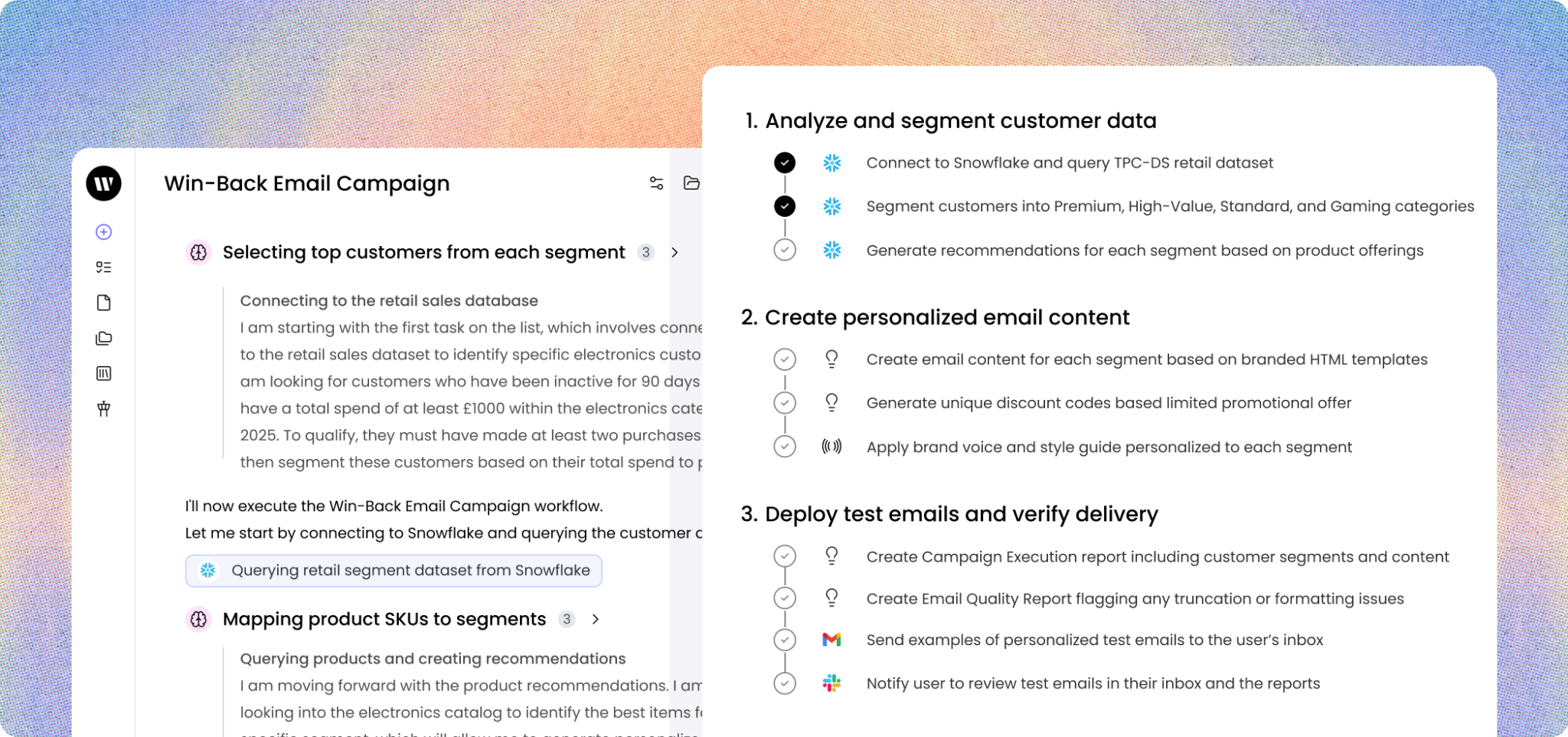
Third, companies can build AI agents through Writer AI Studio. These agents can combine models, company data, instructions, tools, and workflows for particular jobs. An organization could, for example, create one agent for product messaging, another for sales content, and another for editing content against its brand rules.
A simplified Writer workflow looks like this:
- The organization connects approved company information.
- Brand voice, terminology, and editorial rules are configured.
- Teams build or use agents for specific content tasks.
- The agent retrieves relevant company information when needed.
- Content is generated according to the selected instructions and brand rules.
- Writers and editors review the output before it is published.
This approach makes Writer particularly suited to companies where controlling how AI writes and what information it uses matters as much as generating the content itself.
Who Should Use Writer.com?
Writer is primarily suited to organizations rather than users who simply need occasional AI writing assistance. Its current product is positioned around enterprise AI, agents, organizational knowledge, and governance.
It can be particularly useful for:
- Enterprise marketing teams that need many employees to create content while following the same brand rules.
- Content operations teams managing terminology, editorial standards, and writing processes across departments.
- Brand teams that need tighter control over tone, approved language, and messaging.
- Sales teams that want AI-generated emails, messaging, and enablement content based on approved company information.
- Customer support teams that need responses grounded in internal documentation.
- Organizations in regulated industries where content may need stronger controls around approved information and terminology.
- Companies building their own AI workflows rather than relying only on generic chat interfaces.
How Should You Use Writer.com for Writing?
Writer works best when you configure the information and rules around your content before asking teams to generate large amounts of copy.
Some practical ways to use it include:
- Build your Knowledge Graph from approved sources. Add product documentation, messaging documents, research, policies, presentations, and other internal material that writers regularly need. Writer's Knowledge Graph can retrieve information from these sources when agents answer questions or generate content.
- Create separate voice profiles where needed. Your corporate website, demand-generation campaigns, customer education content, and executive communications may not need exactly the same tone. Writer supports voice profiles for different brands, campaigns, audiences, and channels.
- Set approved and restricted terminology. Teams can define terms as approved, "don't use," "use carefully," or pending, along with descriptions and examples. This can be useful when product names, technical terminology, legal wording, or positioning must remain consistent.
- Connect your style guide to the appropriate voice. Writer can automatically apply configured suggestions and terminology to output from Writer Agent and custom agents when they are linked correctly.
- Create task-specific agents instead of one generic writer. A blog-writing agent might use different instructions, data, and style settings from an agent designed for sales emails or product messaging. AI Studio provides different ways to build and manage these agents.
- Use internal information when producing product-heavy content. For example, an article comparing product capabilities can be grounded in current product documentation rather than requiring the writer to paste the same information into every prompt.
- Use Writer for editing as well as generation. A team can check existing drafts against its voice, terminology, and style rules rather than using Writer only to create new text. Writer's style and voice system is designed to apply these controls across content.
- Create shared workflows for recurring content. If your team repeatedly produces product announcements, campaign briefs, sales material, or customer communications, those processes can be turned into agents with predefined instructions and company context rather than rebuilt manually each time.
- Keep human review in the publishing process. Grounding content in internal information and applying brand rules can make the output more consistent, but teams should still review factual claims, positioning, originality, and final wording before publication.
6. Copy.ai
Copy.ai began as an AI copywriting tool, but the product is now positioned as a GTM AI platform for marketing and sales teams. Content generation remains part of the platform, but Copy.ai increasingly focuses on turning repeatable processes such as research, SEO article creation, prospecting, personalization, and content distribution into automated workflows.
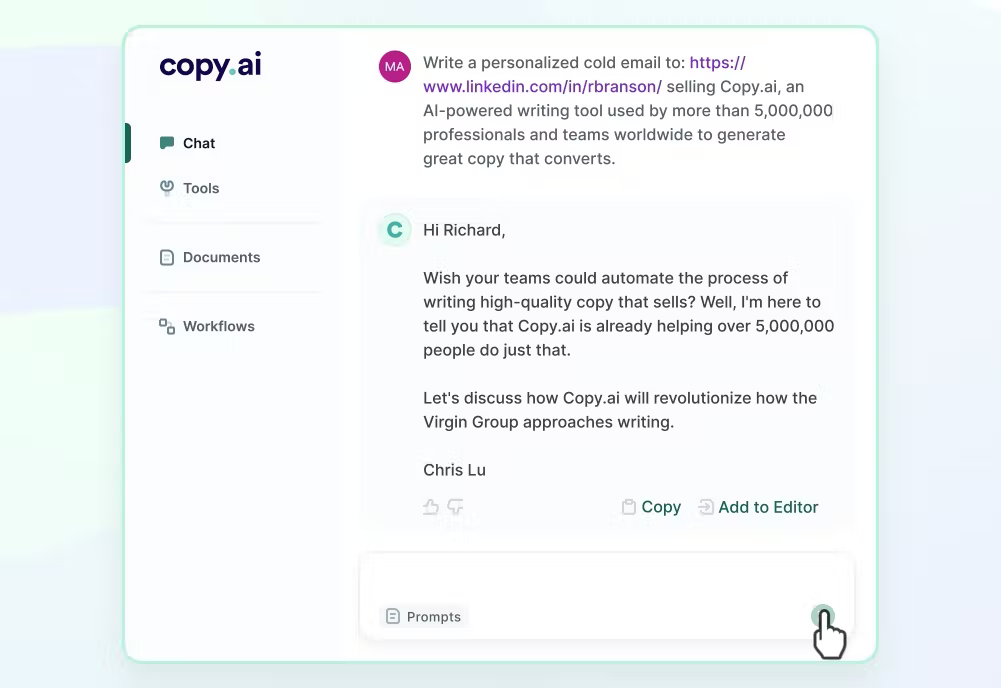
For writers and marketers, this means Copy.ai can still generate individual assets, but its stronger use case is connecting several content-production steps together. A team could take research, transform it into a draft, apply its brand voice, and generate related marketing assets through a repeatable process rather than handling every step manually.
How Does Copy.ai Work?
Copy.ai's current approach is built around Workflows, Actions, company data, and AI generation. A Workflow is a sequence of AI-powered actions connected together to perform a larger business process. Copy.ai gives SEO article creation as one example of a process that can be built this way.
The methodology can be simplified into a few stages:
- You define the task or process that needs to be completed.
- Copy.ai breaks the process into individual Actions.
- These Actions can perform jobs such as research, web scraping, text generation, and other processing steps.
- The outputs of one step can become inputs for later steps.
- Brand information and company context can be incorporated into the generated material.
- The finished workflow can then be reused whenever the same type of content needs to be created.
This is different from generating a blog article using one long prompt. A workflow can separate research, planning, writing, and other tasks so each stage follows predefined instructions.
Copy.ai also provides Infobase, where teams can store company information and reference it when generating content rather than entering the same background material repeatedly.
Its Brand Voice feature works alongside this company context. Copy.ai can analyze examples of existing on-brand content to create a reusable writing style, or users can manually define different voices for particular audiences or authors.
Together, these components make Copy.ai closer to a configurable content-production system than a standalone AI writer.
Who Should Use Copy.ai?
Copy.ai is best suited to teams that create repeatable marketing or sales content and want to standardize more of the process.
It can be useful for:
- Content marketing teams producing SEO articles, thought-leadership content, campaign material, and related assets.
- GTM teams that want writing to connect with prospect research, sales messaging, and other revenue workflows.
- SEO teams creating articles through repeatable research and drafting processes.
- Demand generation teams producing landing pages, emails, ads, and campaign variations.
- Sales teams creating personalized outreach based on account or prospect information.
- Marketing operations teams that want to turn established internal processes into reusable AI workflows.
- Larger content teams that need writers to follow the same source information and brand style.
How Should You Use Copy.ai for Writing?
The best way to use Copy.ai is to identify content tasks your team performs repeatedly and turn those tasks into structured processes.
Some practical ways to use it include:
- Store recurring company information in Infobase. Add product details, positioning, audience information, brand messaging, and other background material that writers repeatedly need. You can then reference this information while creating content.
- Set up Brand Voice before generating content at scale. Give Copy.ai examples of writing that already represents your brand well. You can also create different Brand Voices for separate audiences, channels, or authors.
- Create workflows for SEO articles. Instead of manually repeating research and drafting prompts for every keyword, a workflow can combine research and content generation into a reusable process. Copy.ai specifically lists SEO article creation as a workflow example.
- Build content from several source materials. Copy.ai's content-creation use cases include taking ideas from multiple sources and developing them into larger pieces of thought-leadership content.
- Repurpose one central asset into multiple formats. Once a main article or idea is created, related social posts, emails, sales content, and other assets can be incorporated into the same broader workflow.
- Use workflows for recurring content instead of writing the same prompts repeatedly. Copy.ai allows teams to chain text generation, research agents, web scraping, and other Actions while adjusting prompts and workflow logic.
- Create content processes around GTM campaigns. Marketing and sales teams can connect content creation with research and other campaign tasks rather than treating writing as an isolated activity. Copy.ai currently positions these connected processes as a central part of its GTM AI platform.
- Keep editorial review outside the automated workflow. Automation can make recurring production faster, but writers should still verify factual claims, remove generic passages, check the final structure, and ensure the content says something useful before publishing.
7. Anyword
Anyword is an AI writing platform built mainly for marketing copy where performance matters. Instead of only generating several versions of an ad, email, landing page, or social post, Anyword attempts to predict which version is more likely to perform well for a particular audience, channel, and objective. Its current platform combines generative AI, predictive scoring, brand controls, audience targeting, and historical marketing data.
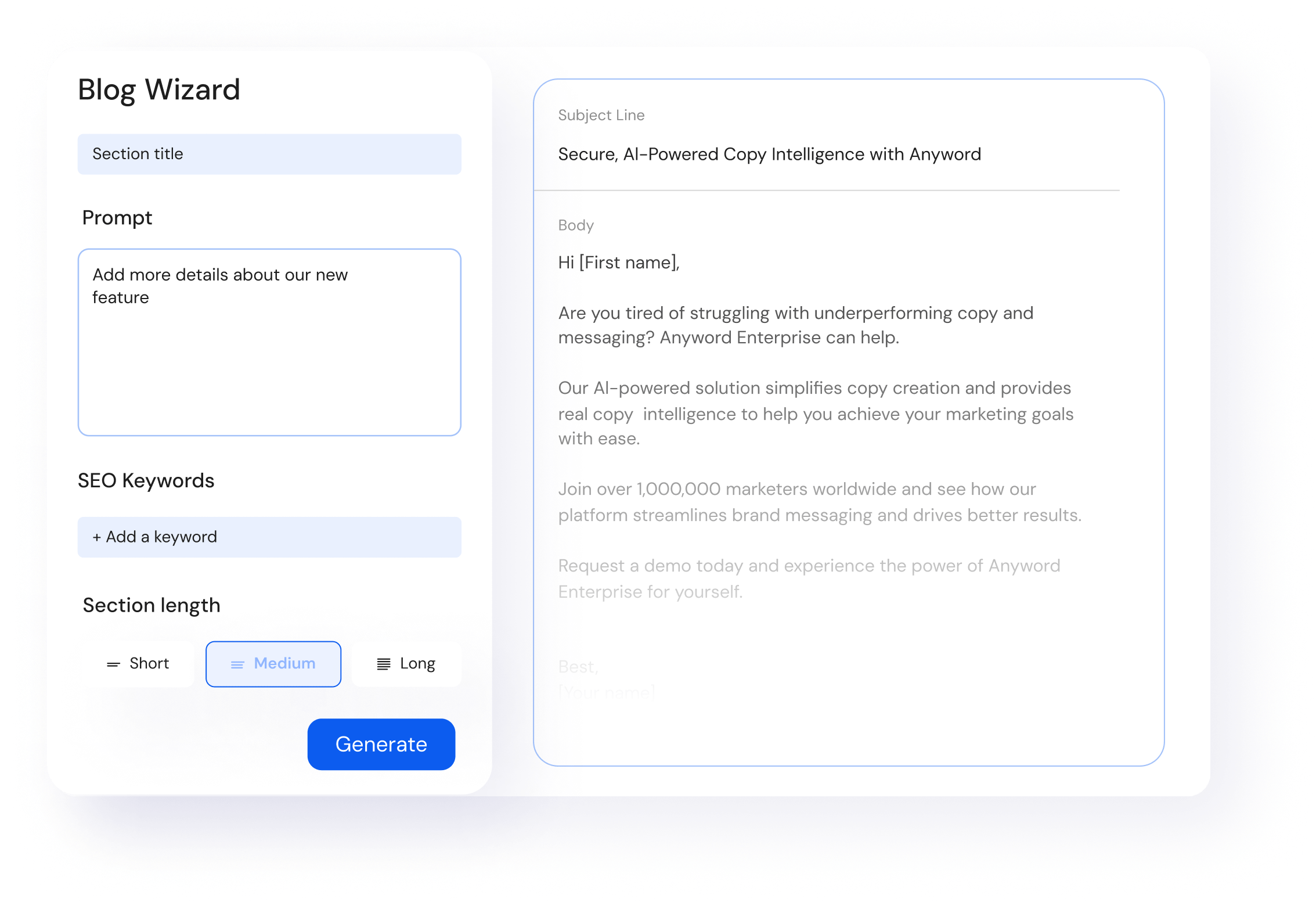
This makes Anyword different from general-purpose AI writers. The main question it tries to answer is not simply, "Can AI write this copy?" but, "Which version should the marketer actually use?"
How Does Anyword Work?
Anyword combines AI content generation with performance data. Its methodology relies on predictive analytics and historical marketing results to score and compare different pieces of copy.
A central part of the system is the Predictive Performance Score. Anyword scores content from 0 to 100 after comparing it with a large database of similar marketing content. Scores can be evaluated by channel, helping marketers compare variations before publishing them.
Anyword also describes its current methodology as reinforcement learning from performance, or RLPF. The system can use brand information, audience data, historical A/B test results, and performance information to add more context to AI prompts before copy is generated.
A simplified workflow looks like this:
- You choose the content type, such as an ad, landing page, email, social post, or website copy.
- You provide information about the product, campaign, audience, and objective.
- Anyword generates several copy variations.
- Each variation can receive a performance prediction based on the intended audience and channel.
- You compare the scores and select or rewrite the strongest options.
- Over time, connected campaign data can be used to make the system more specific to your own marketing performance.
Anyword can also connect with marketing platforms and use historical campaign data. Its Copy Intelligence product currently supports data from channels including Google, Meta, LinkedIn, websites, and other marketing sources.
Who Should Use Anyword?
Anyword is best suited to marketers who create copy tied to measurable actions such as clicks, conversions, sign-ups, or purchases.
It can be particularly useful for:
- Performance marketing teams creating large numbers of ad variations.
- Demand generation teams producing landing pages, emails, and campaign copy.
- Paid media teams that regularly test different headlines, descriptions, and calls to action.
- Email marketers testing messaging for different audience segments.
- Conversion-focused copywriters who want another data point when choosing between several versions.
- Marketing teams running frequent A/B tests and already collecting enough performance data to inform future campaigns.
- Larger brands that need both performance-based writing and centralized brand rules.
Anyword is less suited to open-ended research, long reports, or general-purpose writing. For those tasks, ChatGPT or Claude will usually provide a more flexible environment. Its stronger use case is shorter marketing content where there is a clear outcome that can be measured.
How Should You Use Anyword for Writing?
Anyword is most useful when you generate and compare multiple options rather than accepting the first piece of copy it produces.
Some practical ways to use it include:
- Generate several versions of the same message. Create multiple headlines, ad descriptions, email subject lines, or landing-page variations and compare their predicted performance rather than selecting one based only on personal preference.
- Use Predictive Performance Scores as a selection signal. Anyword scores content from 0 to 100 based on its predicted effectiveness for a particular channel. These scores can help narrow a large set of ideas before real-world testing.
- Create copy for specific audience segments. Anyword lets marketers define audiences and personas, making it possible to adjust messaging around different pain points, motivations, or customer groups.
- Connect historical marketing data. If your organization has enough campaign history, connecting channels such as Google Ads, Meta, or LinkedIn can help Anyword compare new content against previous performance.
- Set your brand rules before producing content at scale. Anyword supports tone-of-voice settings, word lists, style guidelines, audience definitions, and messaging rules to help generated copy stay consistent.
- Build custom models from your own performance data. Anyword can use historical marketing results to create models that reflect a particular brand, product, or client rather than depending entirely on general benchmark data.
- Use it alongside other AI writers. You do not necessarily need Anyword to produce the first draft. Its Chrome extension can score and optimize copy written in tools such as ChatGPT, Google Docs, Notion, and Canva.
- Use predictive scores before A/B testing, not instead of it. A score can help prioritize which options to test, but actual campaign results should remain the final measure of whether a piece of copy works.
- Feed real campaign results back into future work. The more relevant historical performance data you can use, the less the writing process depends on generic assumptions about what should perform well.
Anyword is therefore a better fit for performance writing than general writing. If you are deciding between ten ad headlines or three landing-page variations, its scoring and audience data can make that decision more informed. If you are trying to research and draft a 3,000-word article, other tools in this list will usually be a better starting point.
8. Grammarly
Grammarly is best known as a grammar and editing assistant, but it has expanded into a broader AI writing platform. It can now help users generate drafts, rewrite full sentences and paragraphs, change tone, check grammar and clarity, brainstorm ideas, and work with AI-powered writing agents.
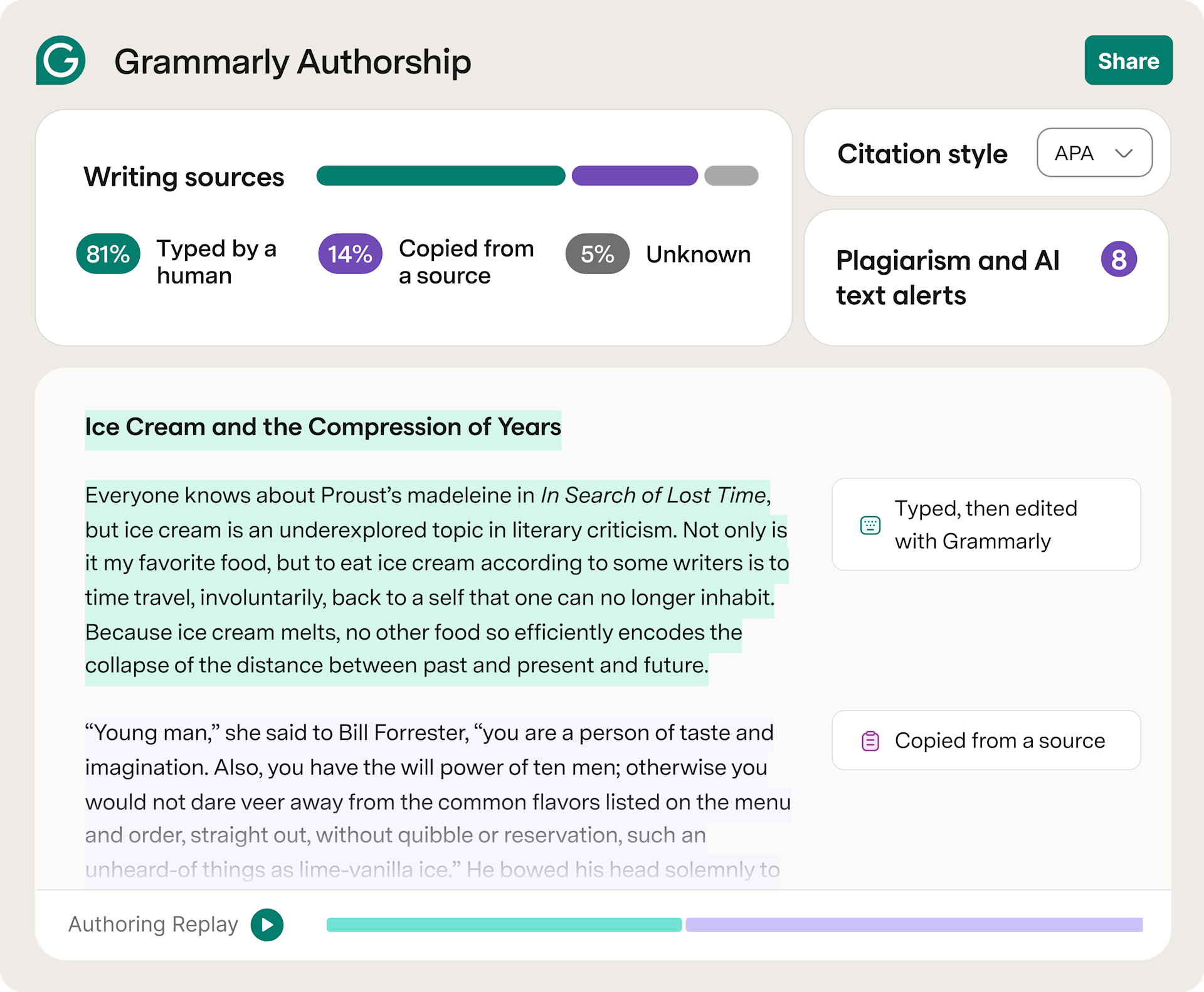
Its main difference from tools such as ChatGPT or Claude is where it sits in the writing process. Grammarly is particularly useful once you already have text and want to improve how it reads. Because it works across browsers, desktop applications, and its own editor, it can assist with emails, documents, messages, articles, and other everyday writing without requiring users to move everything into a separate chatbot.
How Does Grammarly Work?
Grammarly uses machine learning and natural language processing to analyze writing and suggest changes based on grammar, spelling, punctuation, clarity, style, and context. Its tone system also analyzes factors such as word choice, phrasing, punctuation, and capitalization to estimate how a message may sound to the reader.
More recently, Grammarly has added generative AI features alongside its traditional editing system. Users can highlight text and ask Grammarly to rewrite it, adjust tone, generate new text, or work from suggested prompts based on the surrounding content.
Its current AI writing process can include several layers:
- Grammarly analyzes the text you are writing and identifies possible grammar, clarity, tone, and style issues.
- It provides inline suggestions that you can accept or ignore.
- You can use generative AI to rewrite sentences or paragraphs, create new text, or change how existing text sounds.
- Grammarly can use your selected writing goals and audience context when making suggestions.
- Newer AI agents can help with tasks such as proofreading, paraphrasing, reader feedback, and making AI-assisted text sound more natural.
This makes Grammarly a combination of an editor and an AI writing assistant rather than a tool focused only on producing first drafts.
Who Should Use Grammarly?
Grammarly works well for users who write frequently and want assistance during the editing stage.
It can be useful for:
- Content writers who want to clean up drafts before publication.
- Editors reviewing grammar, clarity, sentence structure, and tone.
- Marketing teams writing landing pages, emails, social posts, and campaign copy.
- Sales teams that want clearer and more consistent emails and messages.
- Business professionals writing reports, proposals, documents, and internal communication.
- Students and academic writers who need help reviewing grammar, clarity, citations, or originality.
- Teams that want employees to follow shared brand and writing guidelines. Grammarly's business products include brand and generative AI controls for organizational use.
How Should You Use Grammarly for Writing?
Grammarly is most effective when you use it as an editing layer throughout your normal writing process rather than waiting until the very end.
Some practical ways to use it include:
- Edit first drafts for grammar and clarity. Grammarly can identify spelling, punctuation, grammar, and sentence-level issues while you write.
- Rewrite awkward sentences instead of manually starting over. Full-sentence and paragraph rewrites can help when a section communicates the right idea but the wording feels unclear or repetitive.
- Adjust tone based on the reader. Grammarly can detect tone and suggest changes when a message sounds too formal, uncertain, direct, or otherwise different from what you intended.
- Use generative AI for smaller drafting tasks. Grammarly can help create outlines, replies, short drafts, and ideas without requiring you to leave the application where you are already writing.
- Use reader-focused feedback. Grammarly's newer Reader Reactions agent lets users select a target reader and receive feedback on how the writing may be perceived.
- Review AI-generated drafts from other tools. If you create an article with ChatGPT, Claude, Jasper, or another AI writer, Grammarly can serve as a second editing layer for sentence quality, tone, and readability.
- Use the Humanizer selectively. Grammarly currently provides a Humanizer designed to make AI-assisted writing sound more natural while preserving the intended meaning.
- Check suspected AI-heavy passages before publishing. Grammarly also includes AI detection features that can flag text it believes may have been written or modified by major AI models. AI detection should be treated as an indicator rather than proof of authorship.
- Create shared writing rules for teams. Business users can apply company voice and writing requirements so employees receive more consistent guidance while working.
9. QuillBot
QuillBot is an AI writing assistant built mainly around rewriting, paraphrasing, summarizing, grammar correction, and polishing existing text. It also includes AI Chat, an AI Humanizer, AI Detector, translation, citation generation, and text-generation tools, but paraphrasing remains one of its best-known functions.
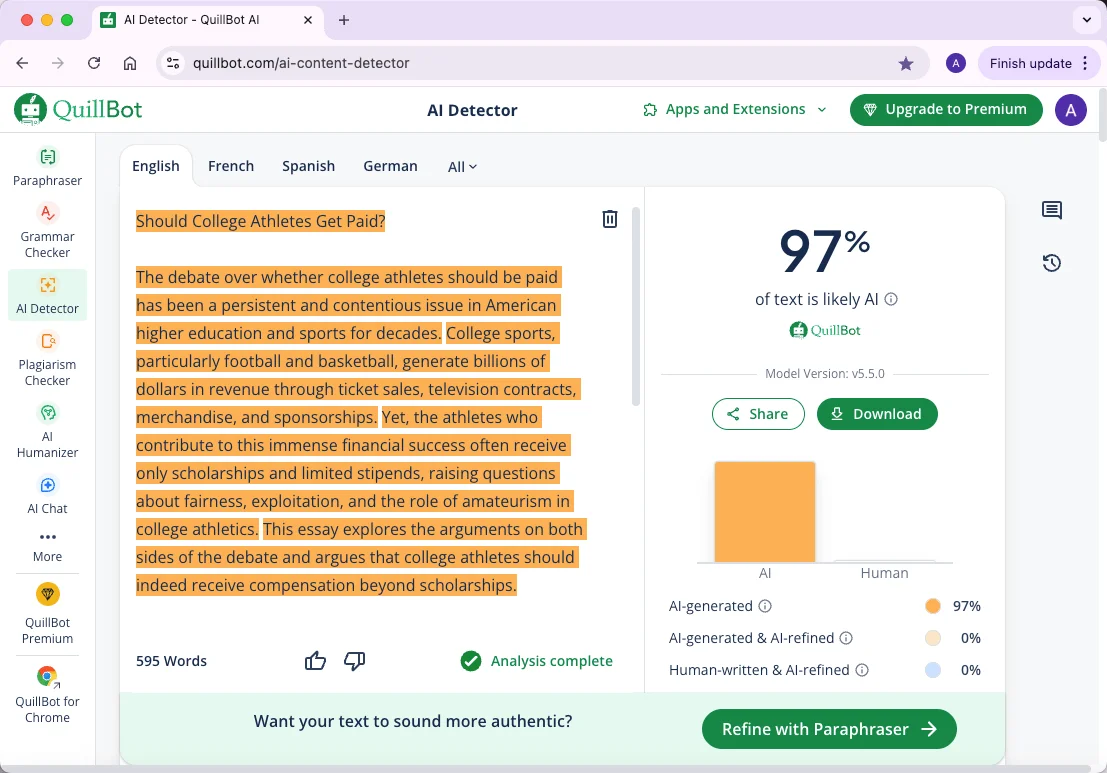
That makes QuillBot somewhat different from tools such as ChatGPT, Claude, or Jasper. You can use those platforms to create a complete article from a blank prompt, while QuillBot is often more useful when you already have a sentence, paragraph, draft, or source document and want to transform it without changing the main meaning.
How Does QuillBot Work?
QuillBot uses AI and natural language processing to analyze the text you provide and generate alternative wording based on the selected task or mode.
Its Paraphraser, for example, rewrites text while attempting to preserve the original meaning. Users can also select alternative words from its AI-powered thesaurus and choose different paraphrasing modes depending on how much they want the original text changed. QuillBot currently provides two modes on its free plan and more than ten additional modes for Premium users.
A typical rewriting process looks like this:
- You paste or upload the text you want to modify.
- QuillBot analyzes its wording, sentence structure, and meaning.
- You select the type of transformation you want.
- The system produces an alternative version while trying to retain the original idea.
- You can manually replace individual words using suggested alternatives.
- The resulting text can then be passed through its grammar, summarization, or other writing tools.
QuillBot's Summarizer works in the opposite direction. Instead of rewriting every sentence, it condenses longer articles, papers, or documents into shorter summaries containing the main information.
Its AI Humanizer is designed to adjust elements such as phrasing, sentence structure, tone, and flow while preserving the intended meaning of AI-generated text.
QuillBot also offers an AI Detector that analyzes patterns such as predictability, repetition, and structural consistency to estimate how likely text is to have been AI-generated. The company itself notes that AI-detection accuracy can vary according to factors such as text length, topic, and how much editing has taken place.
Who Should Use QuillBot?
QuillBot works best for people who already have text and want help refining or transforming it.
It can be useful for:
- Content writers who want alternative ways to phrase repetitive or awkward sections.
- Editors who need to simplify or restructure sentences without rewriting everything manually.
- Students and researchers summarizing papers, rewriting notes, or working with citations.
- Marketing teams creating variations of existing copy for different channels.
- Non-native English writers who want help improving sentence structure, fluency, and word choice.
- Users of ChatGPT, Claude, and other AI writers who want another editing layer after generating an initial draft.
- Professionals who regularly need to shorten, rewrite, or clean up emails, reports, and documents.
How Should You Use QuillBot for Writing?
Rather than putting an entire article through the Paraphraser and accepting every change, use QuillBot selectively for sections where the wording needs work.
Some practical ways to use it include:
- Rewrite sentences that sound repetitive. If several paragraphs use similar sentence structures or phrases, the Paraphraser can provide alternative versions while keeping the same underlying point.
- Try different paraphrasing modes. Different modes can change how closely the rewritten version follows the original, making it easier to choose between minor edits and larger rewrites.
- Change individual words instead of rewriting everything. QuillBot's thesaurus lets you select a word and review alternatives, giving you more control over the final sentence.
- Summarize research before writing. Long reports, papers, or articles can be condensed into shorter paragraphs or key points before you build an outline from them.
- Use the Grammar Checker after paraphrasing. Rewriting can occasionally create awkward sentences, so running the result through a grammar check provides an additional editing pass. QuillBot's checker looks for grammar, punctuation, and spelling problems.
- Use the Humanizer carefully on AI-generated drafts. It can adjust tone, flow, phrasing, and sentence construction, but you should still manually review the result to make sure your meaning and writing style have not changed.
- Use AI Chat for writing questions and feedback. QuillBot now includes AI Chat alongside its rewriting tools, allowing users to ask follow-up questions while working on their content.
- Use the browser extension when you write across several platforms. QuillBot's Chrome extension brings paraphrasing and writing assistance into other web-based writing environments.
- Treat AI detection as an estimate. QuillBot reports a probability score rather than definitive proof that a text was written by AI, and the company states that accuracy can vary.
QuillBot is therefore less about replacing the entire writing process and more about improving text that already exists. It works particularly well as a second-stage tool after drafting, when you need to shorten, rewrite, simplify, summarize, or find a clearer way to communicate the same idea.
10. Frase.io
Frase.io is an AI writing and content optimization platform built mainly for SEO teams, content marketers, and writers creating search-focused content. Instead of starting only from a prompt, Frase analyzes the search results for a target query, identifies the topics and questions appearing across ranking pages, builds a content brief, helps generate the draft, and scores the content while you write.
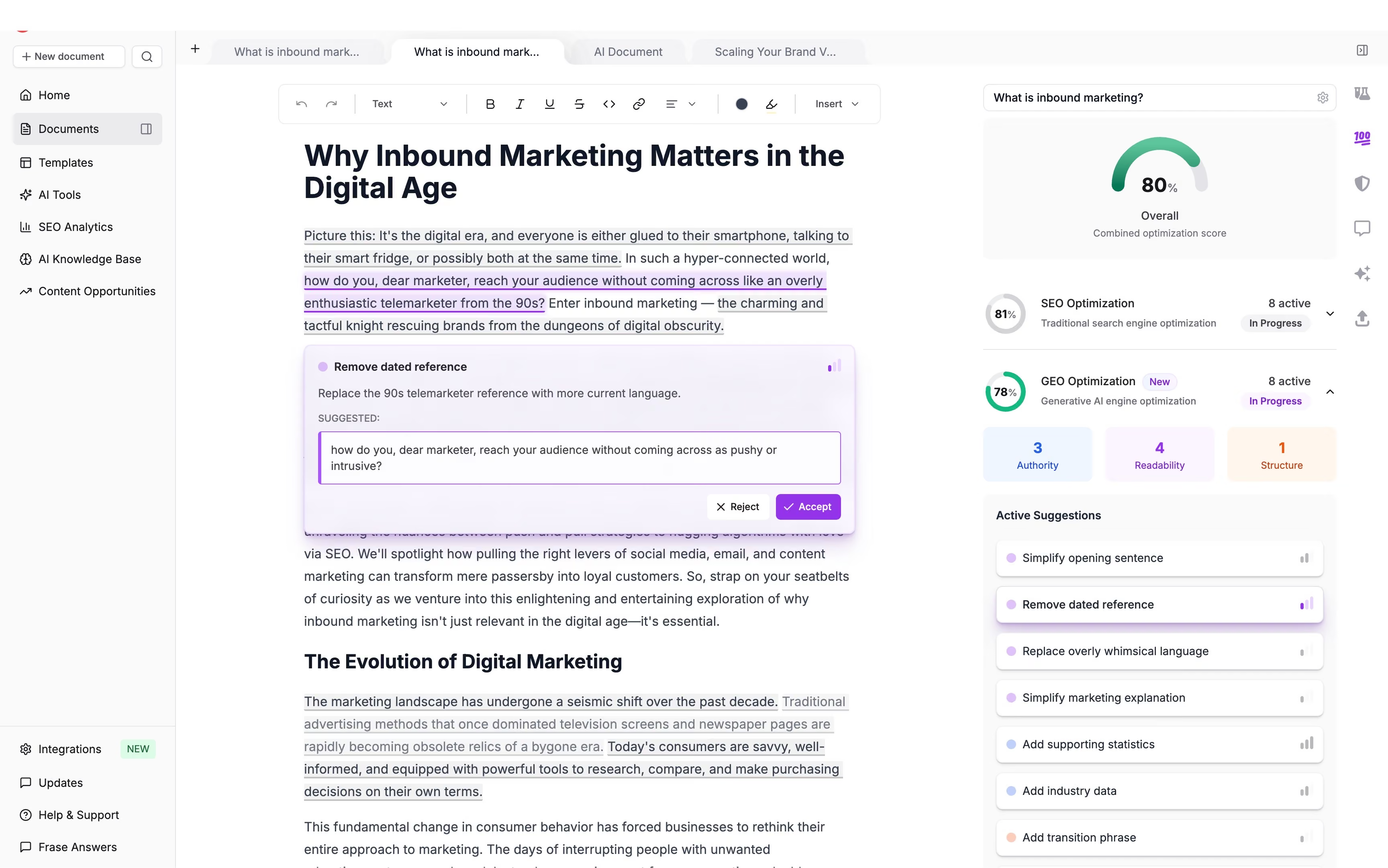
This makes Frase different from general-purpose AI assistants such as ChatGPT or Claude. Its writing process is tied directly to SERP research and content optimization. Frase has also expanded its product around GEO and AI search, so its current workflow considers both traditional Google rankings and how content may appear in AI-generated answers.
How Does Frase.io Work?
Frase begins with the search query you want to target. According to its documentation, the platform processes the top 20 Google results and uses natural language processing to identify semantic terms and topics that appear across those pages.
From there, Frase can turn the SERP analysis into a writing brief. Its brief can include:
- Average word and heading counts from ranking pages.
- AI-generated title suggestions based on search intent.
- Google People Also Ask questions.
- Titles, descriptions, and links from the top search results.
- Suggested article structure based on ranking content.
- Related topics and keyword groups.
- Questions gathered from sources such as Reddit and Quora.
A simplified Frase workflow looks like this:
- You enter the keyword or query you want to target.
- Frase analyzes the current search results for that query.
- It identifies recurring topics, questions, headings, and content patterns.
- You create or generate a content brief and outline from that research.
- Frase's AI Writer uses the brief, your instructions, and available context to generate sections or a complete article.
- The draft receives a live content score based on the current search results.
- You can revise missing topics, headings, titles, meta information, and other content elements before publishing.
The methodology is therefore less about asking an AI model to decide what an article should contain on its own. Frase first uses SERP data to give the model more context about what searchers are seeing and what competing pages cover.
Who Should Use Frase.io?
Frase is best suited to people whose writing is closely connected to organic search.
It can be particularly useful for:
- SEO content writers who need SERP research and writing tools in the same workspace.
- Content marketers creating blogs, guides, comparison pages, and other organic-search content.
- SEO teams that want to create briefs for writers based on current search results.
- Content editors reviewing whether an article has missed topics or questions covered by competitors.
- Agencies managing SEO content for several websites or clients.
- Blog teams producing articles around a large set of target keywords.
- Teams refreshing old content that has lost rankings or no longer matches what currently appears in the SERP.
Frase is less suited to tasks where search performance has little relevance, such as internal reports, general business writing, creative writing, or sales emails. A broader assistant may be easier for those jobs.
How Should You Use Frase.io for Writing?
Frase works best when you treat the SERP research as input for editorial decisions rather than automatically following every recommendation.
Some practical ways to use it include:
- Analyze the SERP before creating the outline. Frase's SERP tab shows ranking pages and their heading structures, helping you see the main angles competitors are already covering.
- Create a content brief before drafting. Use the brief to bring search intent, competitor structure, questions, topics, and expected depth into one place before assigning the article to a writer.
- Review competing structures without copying them. Frase can show H2 and H3 structures from ranking pages. Use those patterns to identify expected topics and missing areas, then build an article structure that still has its own point of view.
- Use the AI Writer after setting the context. Frase states that its AI Writer relies on the context supplied to it, so adding a clear outline, source information, instructions, and brand direction can make the generated draft more focused.
- Use the content score while editing. Frase compares the draft with current ranking pages and identifies content gaps while you write. Use the score as a guide rather than trying to increase it by inserting every suggested term.
- Use Frase for content refreshes. You can import an existing URL, compare it against what currently ranks, and identify areas where the page may have fallen behind. This is useful for older articles that previously performed well but have started losing traffic or positions.
- Check search questions before adding FAQs. The brief includes People Also Ask and other commonly appearing questions, which can help you decide which questions deserve their own sections or FAQ answers.
- Use brand voice for first drafts, then edit manually. Frase's AI Article Writer can draft using a configured brand voice, but the output should still be reviewed for factual accuracy, originality, examples, and writing quality.
- Connect writing with publishing when useful. Frase currently supports publishing content to a CMS from the same broader workflow, reducing the number of separate steps between optimization and publication.
Frase.io is therefore best viewed as an SEO writing workflow rather than only an AI writer. Its main benefit comes from combining SERP research, briefs, outlining, AI drafting, and live optimization in one place. For writers producing content primarily for organic search, that can be more practical than generating a draft in one tool and performing SEO research separately.
Frequently Asked Questions
Which is the best AI writing tool overall?
There is no single best option for every user. ChatGPT and Claude are strong general-purpose choices for research, drafting, and editing. Jasper and Writer.com are better suited to teams that need brand controls and structured workflows, while Frase.io and Writesonic are more useful when SEO is a major part of the writing process.
Is ChatGPT the best AI tool for writing?
ChatGPT is one of the most flexible options because it can handle research, outlining, drafting, rewriting, editing, file analysis, and content repurposing. However, specialized tools may be better for particular tasks. Grammarly is stronger for day-to-day editing, Anyword focuses more on performance copy, and Frase.io is built around SEO-focused content.
Is Claude better than ChatGPT for writing?
Claude can be particularly useful for long-form writing and projects that involve large amounts of source material. ChatGPT offers a broader range of general-purpose workflows and tools. The better option depends on how you work and what type of content you create.
Which AI writing tool is best for blog writing?
ChatGPT, Claude, Writesonic, and Frase.io are all good options for blog content, but they approach the process differently. ChatGPT and Claude give writers more freedom over research and structure, while Writesonic and Frase.io connect article creation more directly with SEO research and optimization.
Which AI writing tool is best for SEO content?
Frase.io and Writesonic are two of the strongest options in this list for SEO-focused writing because they combine content creation with keyword research, SERP analysis, content planning, and optimization. General-purpose tools such as ChatGPT can also work well when you provide your own SEO research and brief.
Which AI writing tool is best for marketing copy?
Jasper, Copy.ai, and Anyword are particularly suited to marketing content. Jasper focuses heavily on brand consistency and campaign content, Copy.ai is built around repeatable GTM workflows, and Anyword is more focused on performance-oriented copy such as ads, emails, and landing pages.
Can Google detect AI-written content?
Google's public guidance focuses on the quality and usefulness of content rather than whether AI was involved in producing it. AI-generated content can still perform poorly if it is thin, repetitive, inaccurate, or created mainly to manipulate search rankings. The safer approach is to treat AI as part of the writing process rather than using it to publish large amounts of unreviewed content.